A Practical Guide to GUI Testing
Graphical User Interface (GUI) testing is essential for ensuring that applications are intuitive, reliable and fully functional from a user perspective. While backend and API testing validate system logic, GUI testing focuses on how users actually interact with software.
Understanding how to test GUI applications effectively allows organisations to deliver consistent user experiences across desktop, mobile, Web and virtual environments.
In this guide, we explore how to do GUI testing, including key GUI testing methods, automation strategies, frameworks and best practices for scalable testing.
What is GUI Testing?
GUI testing is the process of validating the visual and interactive elements of an application. This includes buttons, menus, forms, navigation flows and overall layout.
It ensures that:
- UI elements display correctly across devices and resolutions
- User interactions behave as expected
- Workflows are clear, consistent and error-free
Why is GUI Testing Important?
The importance of GUI testing lies in its direct impact on usability, reliability and user satisfaction.
Why we need GUI testing
- Users interact with the interface, not the underlying code
- Visual or functional issues can quickly impact trust
- Poor UI performance increases support and maintenance costs
Why is GUI testing important in software testing?
- Ensures consistent behaviour across platforms
- Supports accessibility and usability standards
- Identifies user-facing defects before release
GUI Testing Methods
There are several established GUI testing methods, each suited to different scenarios:
Manual GUI Testing
Testers interact with the application as end users.
Best suited for:
- Exploratory testing
- Usability validation
- Early-stage development
Automated GUI Testing
Uses tools to simulate user interactions and validate UI behaviour.
Best suited for:
- Regression testing
- Repetitive test cases
- Cross-platform execution
Model-Based Testing
Creates models of UI behaviour to generate structured test cases.
Record and Playback Testing
Captures user actions and replays them automatically.
How to Test GUI Applications
If you’re looking at how to test GUI, a structured approach is essential.
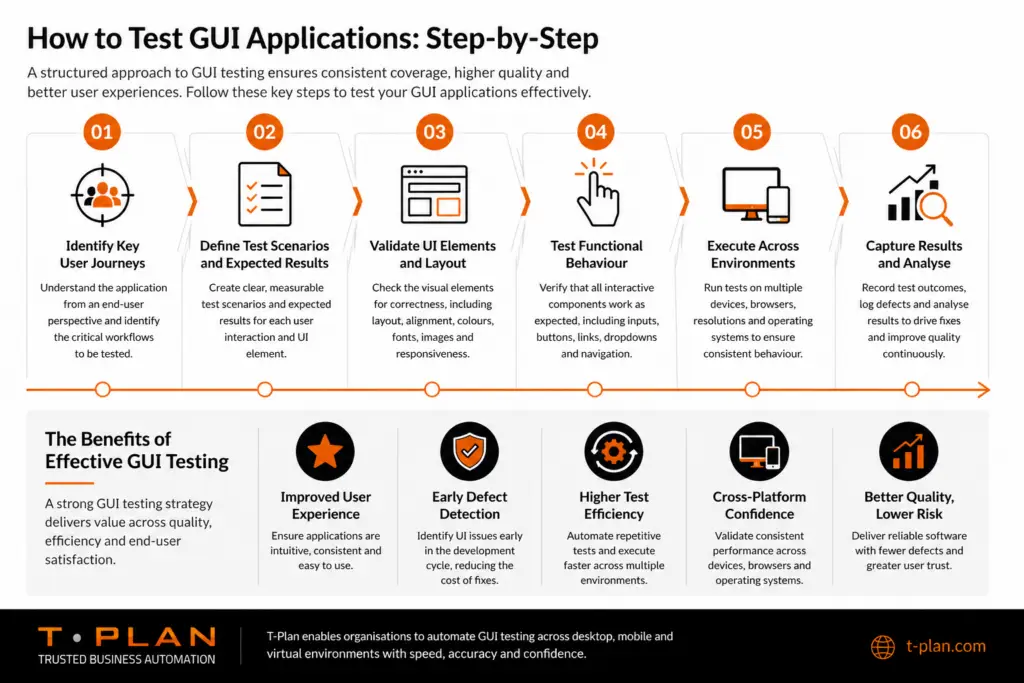
Step-by-step GUI testing approach
- Identify key user journeys and workflows
- Define test scenarios and expected outcomes
- Validate UI elements (layout, positioning, responsiveness)
- Test functional behaviour (inputs, navigation, actions)
- Execute tests across multiple environments
- Capture results and analyse defects
A consistent GUI testing approach ensures repeatability and scalability.
How to Automate GUI Testing
Understanding how to automate GUI testing is key to improving efficiency and coverage.
Core steps to automation
- Select a suitable automation tool
- Build reusable and maintainable test scripts
- Integrate testing into CI/CD pipelines
- Continuously update and optimise test cases
Automation enables:
- Faster execution cycles
- Reduced manual effort
- Consistent and repeatable results
GUI Test Framework
A GUI test framework provides the structure needed to manage automated testing effectively.
Key components include:
- Test scripts and reusable libraries
- Object recognition and interaction methods
- Reporting and logging capabilities
- Integration with development pipelines
A well-defined framework improves maintainability and long-term scalability.
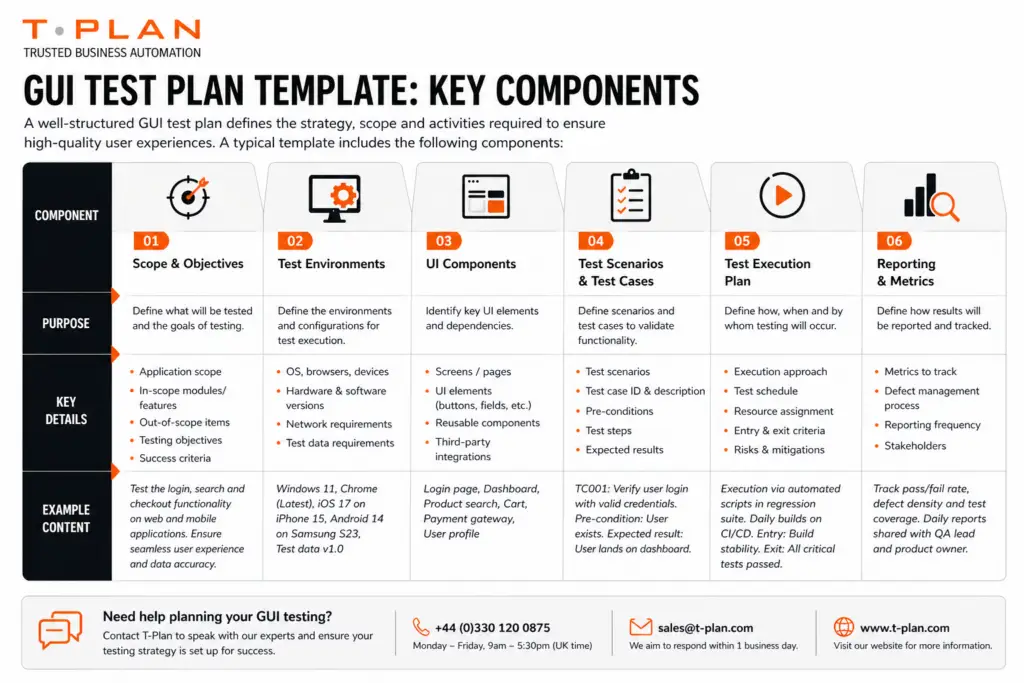
GUI Test Plan Template
Advantages and Disadvantages of GUI Testing
Advantages of GUI Testing
- Validates real user experience
- Identifies visual and usability issues early
- Supports complete workflow validation
Advantages of GUI Testing in Software Testing
- Complements API and backend testing
- Improves overall product quality
- Reduces user-facing defects
Disadvantages of GUI Testing
- Time-consuming when performed manually
- Sensitive to UI changes
- Requires ongoing maintenance for automation scripts
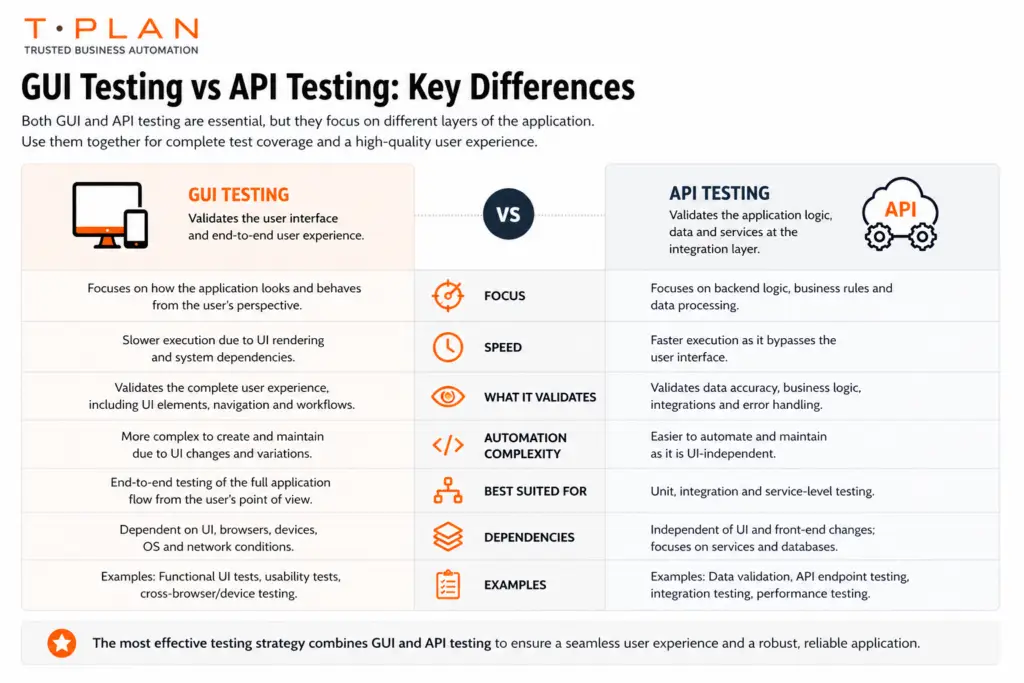
Difference Between API and GUI Testing
Understanding the difference between API and GUI testing helps create a balanced testing strategy.
Both approaches are essential and should be used together.
Best Practices for GUI Testing
- Focus on critical user journeys
- Automate repetitive test cases
- Maintain stable and controlled test environments
- Design robust and reusable test scripts
- Combine GUI and API testing for full coverage
How T-Plan Supports GUI Testing
With over 25 years of experience in GUI test automation, T-Plan enables organisations to scale testing efficiently across complex environments.
T-Plan supports:
- Cross-platform GUI testing across desktop, mobile, web and virtual systems
- Reusable test scripts that run across multiple environments
- Low-code/no-code automation for faster adoption
- Consistent validation across legacy and modern applications
In high-pressure environments, such as defence and public health, this approach has enabled teams to rapidly deploy and execute GUI tests with minimal setup time, significantly improving efficiency and reliability
Conclusion
GUI testing is a critical component of modern software testing strategies. By combining the right GUI testing methods, automation tools and structured frameworks, organisations can ensure consistent, high-quality user experiences.
Whether you are exploring how to test GUI applications or implementing automation at scale, a well-defined approach will deliver measurable improvements in quality, efficiency and reliability.
GUI Testing FAQs
GUI testing validates the visual and interactive elements of an application to ensure usability and functionality.
Follow a structured approach including scenario definition, UI validation, functional testing and cross-platform execution.
Use automation tools to simulate user interactions, create reusable scripts and integrate testing into development pipelines.
It ensures applications are user-friendly, reliable and consistent across environments.
Improved user experience, early defect detection and better end-to-end validation.