A Guide to Cross Browser Testing
Cross browser testing ensures your application delivers a consistent, reliable experience across every browser, operating system and device your users rely on.
With applications expected to perform seamlessly across environments, organisations need a structured and scalable approach to testing.
What is Cross Browser Testing?
Cross browser testing is the process of verifying that a website or application works consistently across different browsers, operating systems and devices.
This includes validating:
- UI rendering and layout
- Functional behaviour
- Performance and responsiveness
Why is Cross Browser Testing Important?
Different browsers render code differently. Even small inconsistencies can lead to broken layouts, missing functionality or poor user experiences.
Why cross browser testing is important:
- Ensures consistent behaviour across platforms
- Protects user experience and brand reputation
- Identifies defects before release
- Reduces costly post-production fixes
Benefits of Cross Browser Testing
A structured approach delivers clear value:
- Consistent user experience across all browsers
- Reduced production risk
- Faster release cycles
- Improved accessibility and usability
- Greater confidence in deployments
Compatibility Testing vs Cross Browser Testing
- Compatibility testing covers all environments including devices, networks and hardware
- Cross browser testing focuses specifically on browsers and operating systems
Cross browser testing is a key part of a wider compatibility testing strategy.
How to Perform Cross Browser Testing
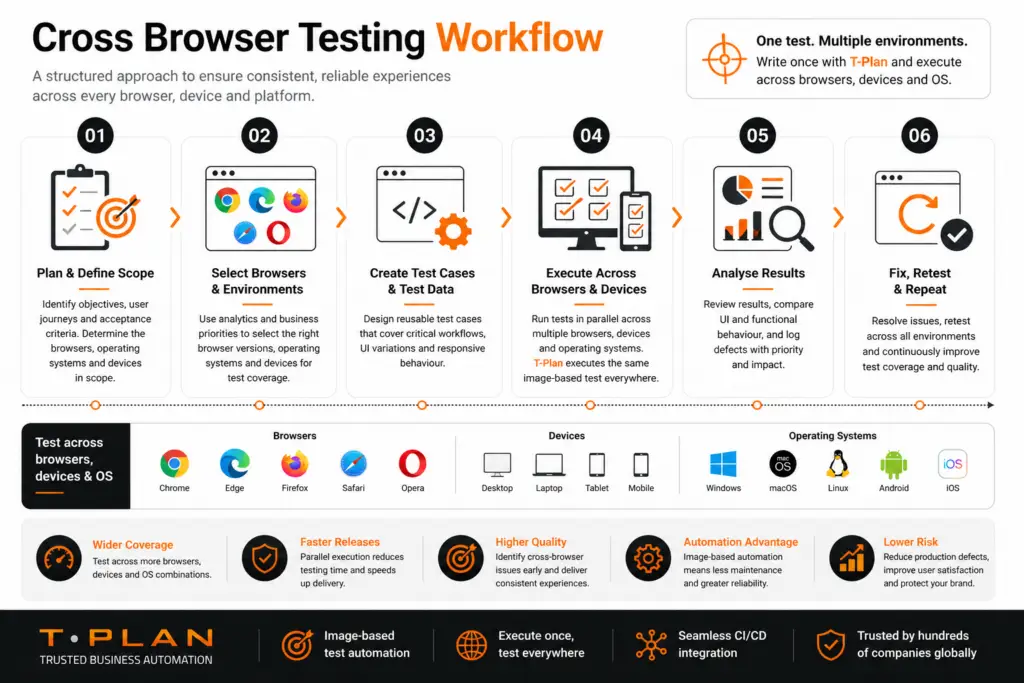
To understand how to perform cross browser testing effectively, it’s important to follow a structured and repeatable process. This ensures consistent behaviour across browsers, devices and operating systems while reducing risk and improving test coverage.
1. Define Browser Coverage
Use analytics and business priorities to identify which browsers and devices to support.
2. Create a Cross Browser Compatibility Test Plan
Your cross browser compatibility test plan should include:
- Target browsers and versions
- Test scenarios
- Expected outcomes
- Automation scope
3. Execute Tests
Validate:
- UI consistency
- Navigation and workflows
- Forms and inputs
- Responsive layouts
4. Analyse Results
Log issues, prioritise fixes and retest across environments.
How to Cross Browser Test a Website
If you’re asking how to cross browser test a website, focus on:
- Critical user journeys first
- Layout comparison across browsers
- JavaScript and CSS behaviour
- Responsive design across screen sizes
Manual testing provides a baseline, but it does not scale.
Automated Cross Browser Testing
Manual cross browser testing can quickly become time-consuming and difficult to scale. Automation enables teams to execute tests faster, improve coverage and deliver consistent results across multiple environments.
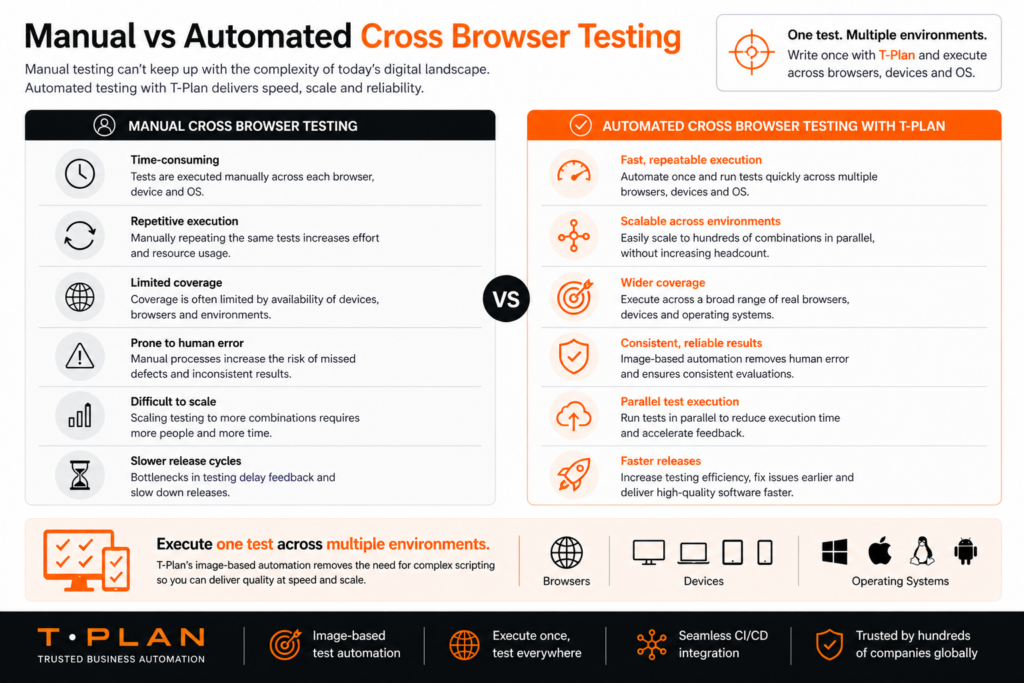
Automated cross browser testing enables teams to test faster and more efficiently.
With automation, you can:
- Run tests across multiple browsers simultaneously
- Reuse test scripts across environments
- Integrate testing into CI/CD pipelines
- Improve accuracy and repeatability
To automate cross browser testing effectively, tools must support real user interaction and UI validation.
T-Plan enables teams to execute the same test across multiple platforms using image-based automation, reducing complexity while improving coverage
Cross Browser Testing Strategy
A strong cross browser testing strategy focuses on efficiency and risk reduction:
Cross Browser Testing Best Practices
Follow these cross browser testing best practices:
- Test early in development
- Use real environments where possible
- Standardise test cases
- Automate regression testing
- Maintain a browser matrix
- Review browser usage regularly
Cross Browser Testing Challenges
Cross browser testing requires validation across a wide range of browsers, devices and operating systems. As the number of combinations increases, a structured and scalable approach is essential to ensure consistent performance without unnecessary testing effort.
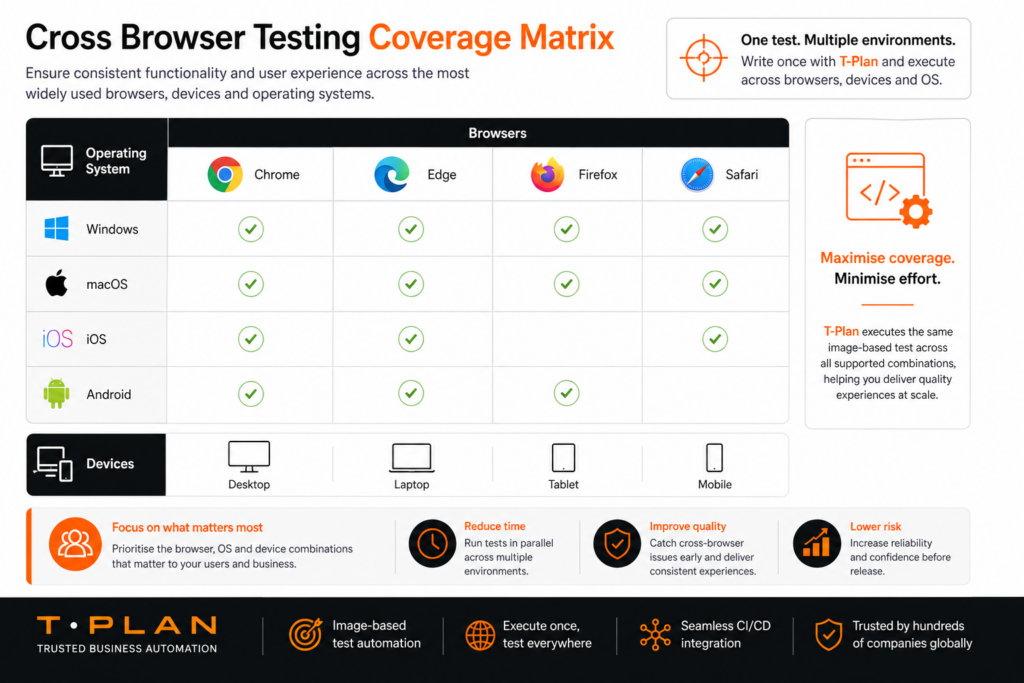
Common cross browser testing challenges include:
- Multiple browser and OS combinations
- Frequent updates and version changes
- Rendering inconsistencies
- High manual effort
- Limited access to real devices
Automation is essential to overcome these challenges at scale.
Best Process for Testing Cross-Browser Compatibility
A proven process includes:
- Define scope
- Build reusable tests
- Automate key workflows
- Execute tests in parallel
- Analyse and resolve issues
- Continuously optimise
Cross Browser Testing Tutorial
A simple cross browser testing tutorial approach:
- Start with a small set of browsers
- Identify critical workflows
- Perform manual baseline testing
- Introduce automation
- Expand coverage gradually
Final Thoughts
Cross browser testing is essential for delivering reliable, high-quality software.
As applications grow more complex, manual testing alone is no longer sufficient. A combination of strategy, automation and continuous improvement is key to ensuring consistent performance across every browser.
Ready to Scale Your Cross Browser Testing?
Manual testing can’t keep up with the complexity of modern applications. T-Plan enables teams to execute one test across multiple browsers, devices and operating systems, improving coverage, speed and reliability.
Cross Browser Testing: Key Questions Answered
Focus on user analytics and business-critical environments such as Chrome, Edge, Safari and mobile browsers on iOS and Android.
Device selection should be based on user behaviour, focusing on the most common screen sizes, operating systems and usage patterns.
Cross browser testing should be carried out during development, regression testing and before release to ensure consistent performance across environments.
Scaling requires a structured approach, prioritised coverage and automation to execute tests across multiple environments efficiently.
Typical issues include layout inconsistencies, CSS rendering differences, JavaScript compatibility problems and responsive design issues.