
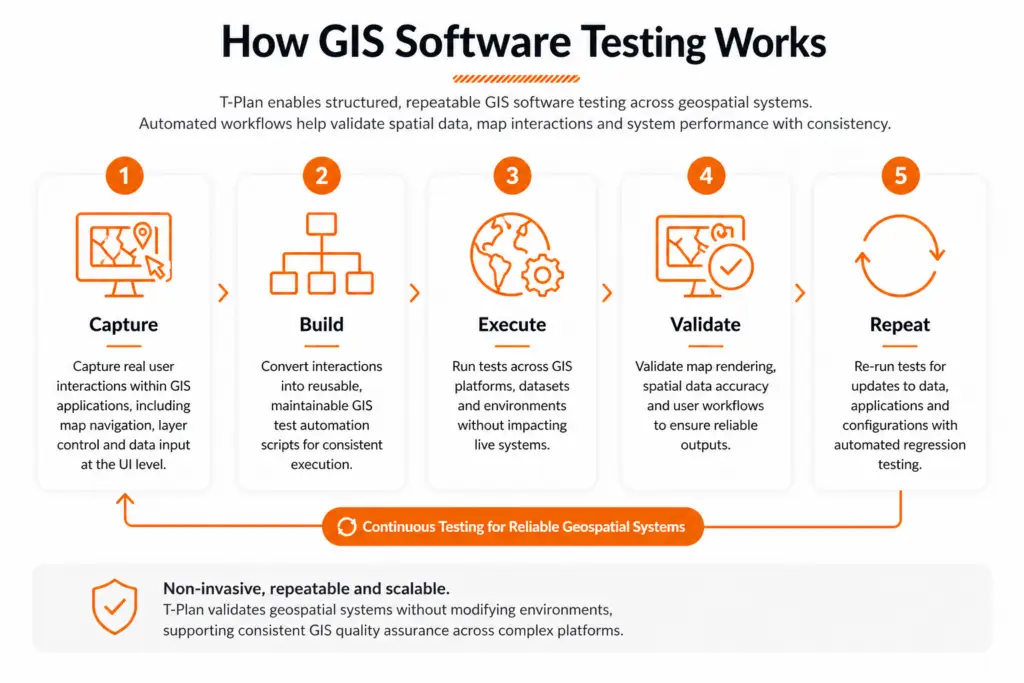
GIS test automation uses automated scripts to validate geospatial applications, improving consistency, scalability and efficiency compared to manual testing.
Geospatial & GIS Software Testing
Geospatial systems play a critical role in data-driven decision-making across industries. Ensuring these systems operate accurately and reliably is essential.
GIS software testing and geospatial software testing enable organisations to validate spatial data, mapping functionality and user workflows with precision. T-Plan delivers scalable GIS test automation and GIS quality assurance, supporting consistent validation across complex environments without disrupting operations.
- Validate spatial data accuracy and geospatial outputs
- Automate complex geospatial workflow automation processes
- Ensure consistent performance across GIS applications
- Reduce risk through repeatable GIS application testing
- Support scalable GIS software testing across environments

Why Choose T-Plan for GIS Software Testing?
Geospatial systems rely on accurate data rendering, complex workflows and consistent user interaction. T-Plan enables GIS software testing at the UI level, allowing teams to validate how geospatial applications behave in real-world conditions, without relying on APIs or backend access.
- True UI-based validation for GIS applications
T-Plan interacts directly with the interface, making it ideal for GUI testing of map rendering, layer controls and user-driven workflows. - Test complex geospatial workflows end-to-end
Validate processes such as data import, transformation, map visualisation and export across GIS platforms. - Technology-agnostic approach
Works across legacy GIS systems, proprietary platforms and modern geospatial tools without requiring integration. - Cross-platform execution
Run the same tests across Windows, Linux, desktop , mobile and virtual environments used in geospatial operations. - Built for change with regression testing
Support automated regression testing to ensure updates to datasets, configurations or applications do not introduce errors. - Scalable GIS quality assurance
Standardise GIS quality assurance across environments, teams and evolving geospatial systems.
Why Automate GIS Software Testing?
GIS applications combine complex user interactions, spatial data processing and visual outputs that must remain accurate across systems and environments. Manual testing struggles to reliably validate this level of complexity, particularly as data and applications evolve.
Automation with T-Plan focuses on validating real user behaviour—ensuring geospatial workflows, map rendering and data-driven interactions perform consistently under change.
Key benefits of automated GIS software testing:
- Validate complex geospatial workflows end-to-end
Test data import, transformation, analysis and map visualisation. - Ensure accuracy of spatial data and visual outputs
Verify map rendering, layers and user interactions through UI-driven validation. - Reduce risk in data-sensitive environments
Minimise errors in mapping, reporting and decision-making systems. - Scale geospatial workflow automation
Execute repeatable tests across datasets, systems and environments. - Maintain consistency across platforms
Validate GIS applications across desktop, virtual and cross-platform environments. - Automate regression testing for ongoing changes
Ensure updates do not introduce defects. - Improve efficiency and reduce manual effort
Increase coverage while reducing repetitive testing.
Key Benefits of GIS Software Testing
Automated GIS software testing enables organisations to validate geospatial systems with accuracy and consistency.
T-Plan supports scalable GIS quality assurance across complex environments, helping teams reduce risk and improve reliability.
No-Code
Required
Simplify GIS software testing with an intuitive interface, enabling both technical and non-technical teams to validate geospatial applications.
Create Once, Repeat Anywhere
Define GIS test automation workflows once and execute them consistently across platforms, datasets and environments.
Record and
Playback
Capture real user interactions within GIS applications and replay them for repeatable GIS application testing.
External Data
Integration
Drive testing using structured geospatial data from spreadsheets, databases and other data sources.
Screen-Level
Automation
Test directly at the user interface using GUI testing, validating map interactions, layers and workflows.
Multi-Platform
Support
Execute geospatial software testing across desktop, virtual and cross-platform environments.
Image-Based for True End-User Simulation
Validate map rendering and visual outputs to ensure accuracy across GIS systems.
Third-Party
Integrations
Integrate with CI/CD tools to support scalable geospatial workflow automation.
“Our test team were able to start producing a script in a usable test entity in 15 minutes… the ability to start repeating tests within 3–4 hours is quite amazing.”

Principal Software Engineer
US Defence
Trusted Across Complex, Data-Driven Environments
T-Plan supports organisations operating in complex, data-driven and high-security environments where accuracy and reliability are critical. Our approach to GIS software testing ensures consistent validation across systems, datasets and platforms.
Trusted by Hundreds of Companies and Used by Thousands of People for Over 25 Years

































Geospatial & GIS Software Testing Use Cases
Geospatial environments rely on accurate spatial data, complex workflows and consistent system performance across platforms.
T-Plan supports GIS software testing across key use cases, enabling reliable validation, improved data accuracy and scalable geospatial workflow automation.
Spatial Data Validation
Ensure coordinates, projections and datasets are processed and displayed correctly across GIS systems.
Map Rendering & Visual Validation
Validate map layers, overlays and UI interactions using GUI testing to ensure accurate visual outputs.
Geospatial Data Processing Workflows
Test workflows involving data ingestion, processing and analysis across multiple systems.
Coordinate System & Projection Testing
Validate transformations between coordinate systems to ensure spatial accuracy and consistency.
Large Dataset & Performance Validation
Test GIS applications under heavy data loads to ensure performance, responsiveness and stability.
Multi-Source Data Integration Testing
Validate geospatial data inputs from APIs, databases and external sources across environments.
Cross-Platform GIS Testing
Ensure consistent behaviour across desktop, virtual and cross-platform GIS environments.
Continuous Regression Testing for GIS Systems
Automate regression testing to validate ongoing updates to data, configurations and applications.
Automated geospatial software testing enables teams to validate complex GIS environments with greater accuracy, reduce risk and maintain consistent performance as systems evolve.
Platform Agnostic, Seamless Integration
Integration Capabilities
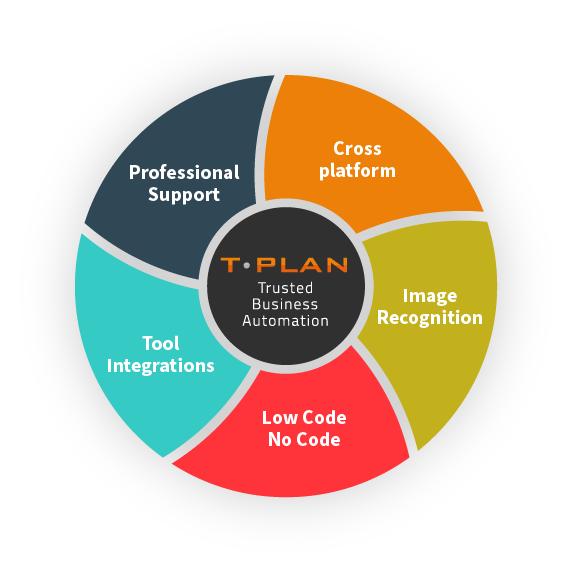
Integrates with a range of tools, including Selenium for script-less automated browser testing, and Jenkins for continuous integration, saving time & effort vs building and maintaining external testing frameworks.
Platform Agnostic
Automates GUI testing seamlessly across web and mobile platforms, supporting both Mac, Windows, and Linux environments with unified application, code, and file compatibility.
Image Recognition
Providing essential user feedback directly from the end-user’s perspective. Validated based on what is visually observed, not solely on the code’s output.
Code -Free Automation
An intuitive user interface designed for both technical and non-technical users, featuring drag-and-drop functionality. No Code / Low Code.
GIS Software Testing FAQs
GIS software testing is the process of validating geospatial applications, ensuring that spatial data, mapping functionality and workflows operate accurately across systems and environments.
GIS quality assurance ensures that spatial data, coordinates and visual outputs are correct, reducing the risk of errors in mapping, reporting and decision-making systems.
Geospatial workflow automation enables teams to validate complex processes such as data ingestion, processing and visualisation across GIS systems with consistent, repeatable results.
GUI testing validates real user interactions such as map navigation, layer controls and visual outputs within GIS systems.
Regression testing ensures that updates to data, configurations or applications do not introduce errors, maintaining consistent performance over time.