A Guide to UX Defects, Business Risk, Visual Validation and Automation Strategy
UX and UI defects are often treated as minor visual issues.
A button shifts slightly. A form renders incorrectly. A workflow behaves differently across devices. A modal overlaps content. Text becomes unreadable on smaller screens.
Individually, these issues may appear insignificant.
However, when UX defects accumulate across applications, platforms and customer journeys, the business impact can become substantial.
Poor user experience directly affects conversion rates, customer trust, operational efficiency, support costs and user retention. Yet many organisations still struggle to quantify the commercial impact of UX instability.
The challenge is that UX defects are difficult to measure using traditional testing metrics alone.
Functional tests may pass while customers still experience:
- confusion
- friction
- inconsistent workflows
- visual regressions
- usability failures
This creates a gap between technical validation and real-world user experience.
This guide explains how organisations can classify UX defects, measure their business impact and use visual automation strategies to improve testing quality, reduce operational risk and strengthen customer experience consistency.
What Are UX/UI Defects?
UX/UI defects are issues that negatively affect how users interact with software, even when core functionality technically works.
Unlike critical system failures, UX defects often involve:
- layout inconsistencies
- visual rendering issues
- confusing workflows
- inaccessible interfaces
- broken responsive behaviour
- inconsistent navigation
- unclear messaging
- usability friction
Many defects don’t immediately break applications.
Instead, they gradually reduce usability, confidence and customer satisfaction over time.
Why UX Defects Are Increasing
Software environments have become significantly more complex.
Applications must now support multiple browsers, responsive layouts, mobile devices, remote desktops, virtualised environments and dynamic frontend frameworks, all while operating within increasingly rapid release cycles.
At the same time, organisations are adopting Agile delivery, CI/CD pipelines and AI-assisted development approaches that accelerate frontend iteration and interface change.
This creates more opportunities for visual inconsistency and UX instability.
Even relatively small UI updates can introduce rendering problems, broken layouts, hidden elements or inconsistent workflows across environments. Traditional functional testing often struggles to identify these issues because the application may still technically function while the user experience degrades.
The Hidden Business Cost of UX Defects
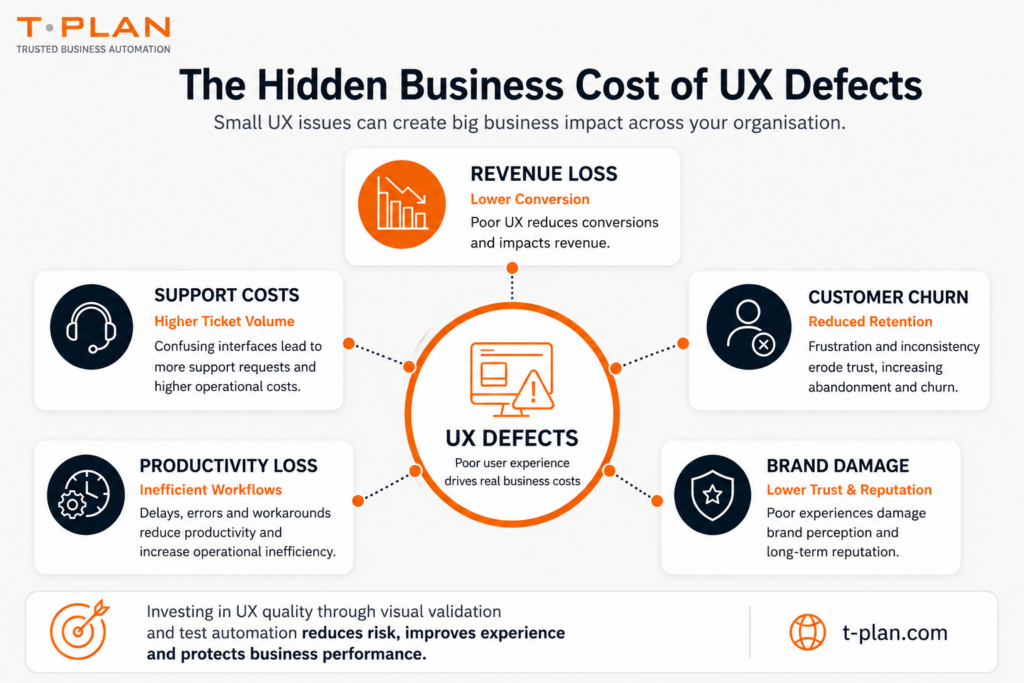
Many organisations underestimate the operational impact of UX failures because the effects are often distributed across multiple business functions.
Even relatively small UX issues can affect:
- revenue performance
- customer retention
- operational efficiency
- support overhead
- brand perception
Poor UX creates friction across both customer-facing and internal workflows.
Confusing navigation, inconsistent interfaces, broken responsive behaviour and unclear user journeys can reduce conversion rates, increase support demand and negatively affect customer trust.
Over time, repeated UX/UI instability may contribute to:
- customer churn
- reduced productivity
- operational inefficiency
- lower platform engagement
- reputational damage
For enterprise organisations operating across complex environments, even relatively small UX regressions can create significant long-term business impact.
Why Functional Testing Alone Is Not Enough
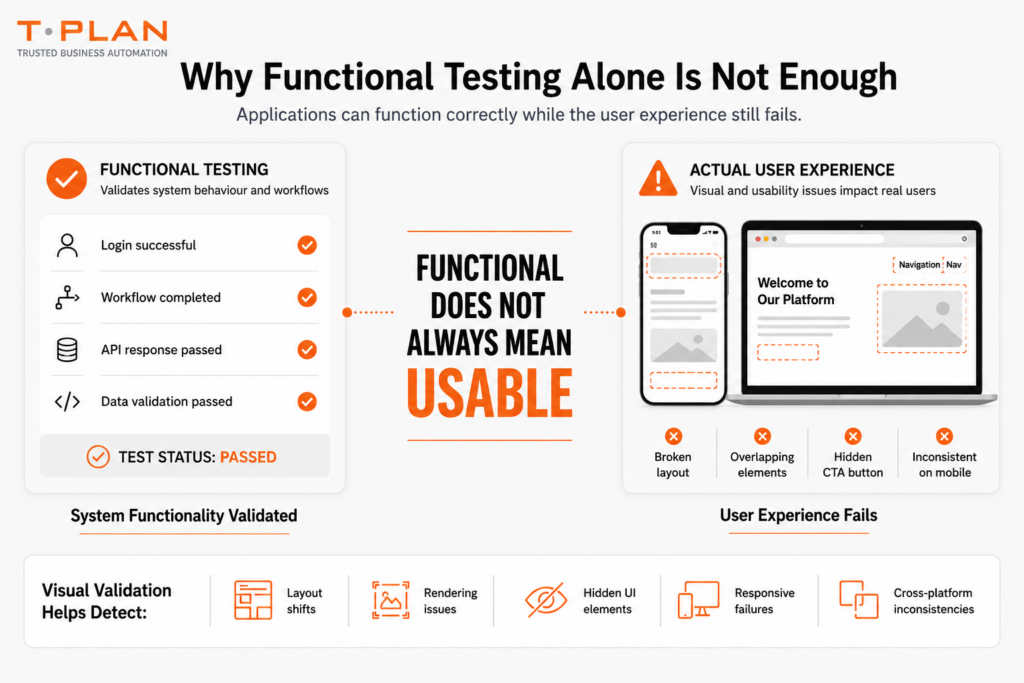
Traditional automation validates whether applications function correctly, but passing tests do not always guarantee a reliable user experience.
Visual defects, layout failures and responsive rendering issues may still affect usability even when workflows technically pass.
This creates a dangerous false confidence where applications appear stable in automation pipelines while real user experience quality continues to degrade across environments and devices.
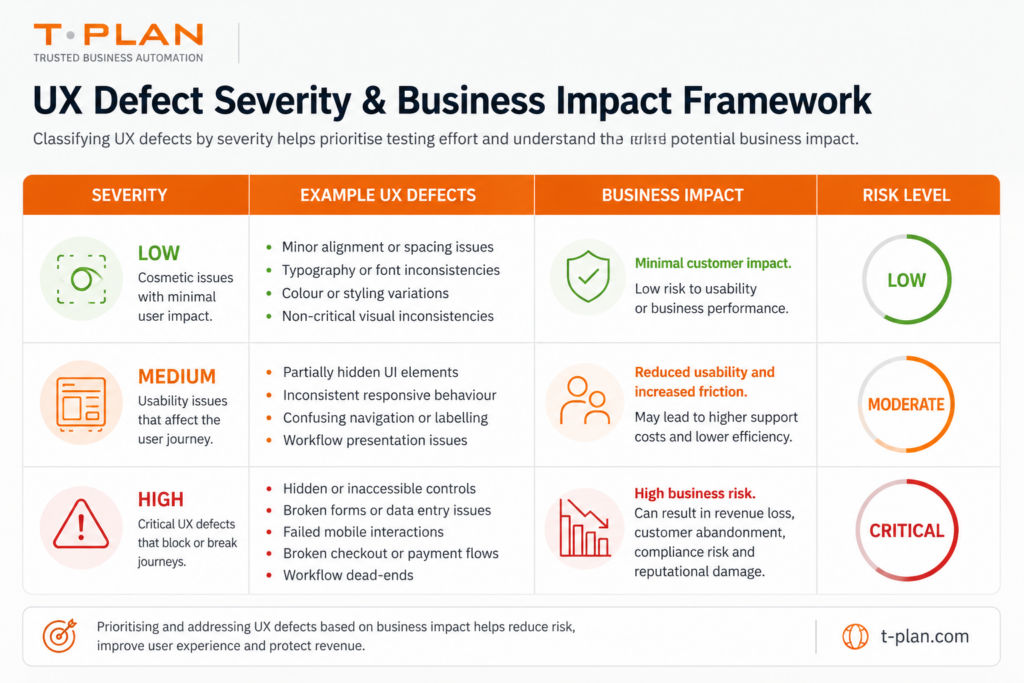
A Framework for Classifying UX Defects
Not all UX defects carry the same operational or commercial impact.
Organisations should classify UX issues based on severity, visibility and business risk to help prioritise testing effort and reduce operational exposure.
How to Measure the Cost of UX Defects
Conversion Metrics
Track:
- checkout completion
- sign-up success
- onboarding completion
- form abandonment
UX regressions often correlate directly with conversion decline.
Support Metrics
Track:
- ticket volume
- usability complaints
- onboarding support
- workflow-related support requests
Rising support demand may indicate growing UX instability.
Operational Efficiency
Track:
- task completion time
- workflow interruption rates
- manual workaround frequency
- employee productivity delays
Customer Experience Metrics
Track:
- NPS scores
- customer satisfaction
- retention performance
- churn rates
Accessibility & Compliance
Track:
- responsive inconsistencies
- accessibility failures
- cross-platform rendering issues
For regulated industries, UX/UI problems may also create compliance exposure.
A Simple UX Defect Cost Framework
Organisations can estimate UX defect cost using a simple model:
UX Defect Cost =
(Affected Users × Productivity Loss)
+
(Support Cost Increase)
+
(Conversion Loss)
+
(Reputational Risk)
Even conservative estimates often reveal that relatively small UX failures create significant long-term operational cost.
Why Visual Validation Matters
Visual automation validates what users actually see rather than simply validating backend functionality.
This helps organisations detect:
- rendering inconsistencies
- broken layouts
- hidden UI elements
- responsive failures
- visual regressions
- UI drift
Unlike purely object-based testing, visual validation focuses directly on user experience consistency.
This is increasingly important within:
How Visual Automation Helps Reduce UX Risk
Visual automation helps organisations identify UX regressions earlier and improve consistency across environments before defects reach production.
Combined with functional automation, visual validation strengthens:
- release quality
- user experience consistency
- cross-platform reliability
- automation trust
- workflow visibility
This helps reduce false confidence while improving long-term testing reliability.
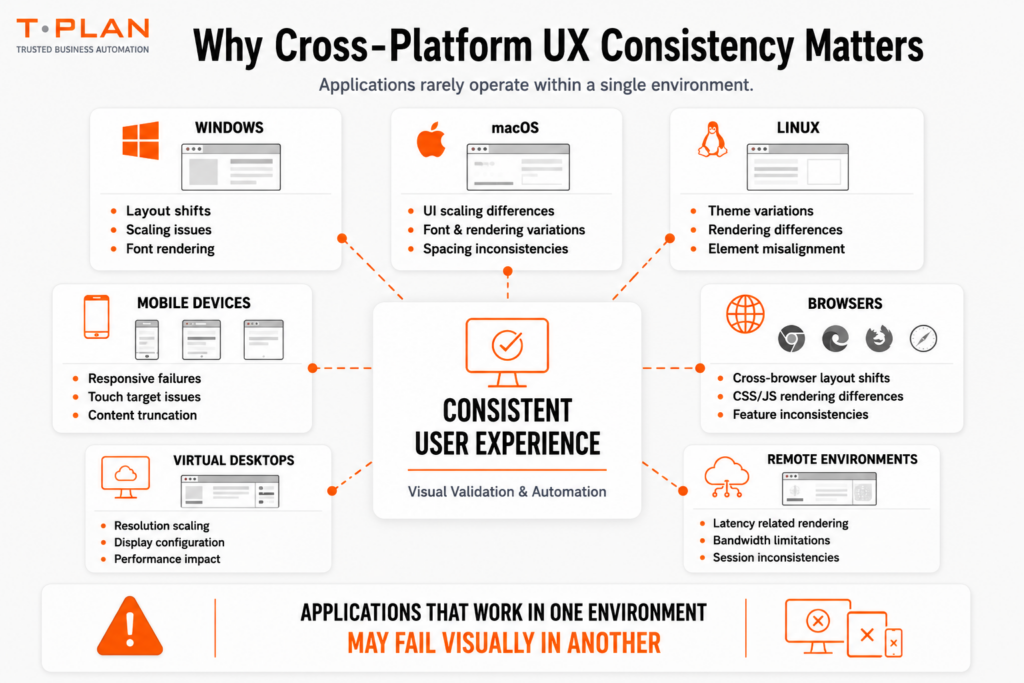
Why Cross-Platform UX Consistency Matters
Applications rarely operate within a single environment.
Enterprise systems often run across:
Interfaces that appear stable in one environment may fail visually in another.
Cross-platform UX validation helps organisations maintain consistent user experience quality across complex infrastructures and deployment models.
How T-Plan Supports UX Validation
T-Plan provides visual, cross-platform automation designed for enterprise testing environments.
T-Plan helps organisations validate:
- visual UI consistency
- desktop applications
- responsive behaviour
- remote desktop environments
- Citrix systems
- legacy applications
- cross-platform workflows
By combining visual automation with repeatable testing strategies, organisations can reduce UX instability while improving confidence in release quality.
With over 25 years of automation experience, T-Plan helps organisations build trusted automation strategies that prioritise consistency, visibility and real user experience validation.
Why UX Quality Is Now a Business Metric
UX quality is no longer purely a design consideration.
It directly affects:
- revenue
- productivity
- operational efficiency
- customer trust
- retention
- competitive performance
As applications become more dynamic and release cycles accelerate, organisations increasingly need testing strategies that validate more than functionality alone.
The organisations that succeed will focus on:
- visual consistency
- user experience stability
- cross-platform validation
- measurable UX quality
- trusted automation
Because in current software environments, a technically functional application isn’t always a usable one.
UX defects FAQs
A UX defect is an issue that negatively affects usability, workflow consistency or visual experience, even if the application still functions technically.
UX defects can reduce conversion rates, increase support costs, lower productivity and negatively affect customer trust.
Functional tests validate workflows and backend behaviour, but they may not detect layout problems, visual regressions or usability failures.
UX testing ROI can be measured through improvements in conversion rates, reduced support requests, lower churn and improved operational efficiency.
Visual automation validates what users actually see, helping organisations detect rendering issues, responsive failures and cross-platform UX inconsistencies.
VDI performance testing tools are used to validate infrastructure responsiveness, concurrent session handling, scalability and user experience across virtual desktop infrastructures and remote desktop environments.