A Guide to Planning, Measuring and Optimising Virtual Desktop Performance
Virtual Desktop Infrastructure (VDI) has become the backbone of many enterprise IT environments, supporting remote work, secure application delivery and centralised desktop management. However, even a well-designed VDI environment can suffer from slow logins, poor application responsiveness and inconsistent user experiences if performance isn’t regularly monitored and tested.
Testing VDI performance helps organisations identify bottlenecks before they affect users, validate infrastructure changes and benchmark performance over time. Whether you’re deploying new virtual desktops or maintaining an existing environment, a structured testing approach provides confidence that users receive a fast, reliable experience.
This guide explains how to create a VDI test plan, measure the right performance metrics and automate testing across enterprise virtual desktop environments.
What Is VDI Performance Testing?
VDI performance testing is the process of measuring how well a virtual desktop infrastructure performs under different operating conditions. Rather than simply checking whether users can log in, performance testing evaluates how responsive the entire environment remains during everyday use and under peak demand.
A typical VDI performance test measures:
- Login duration
- Desktop launch times
- Application response times
- Network latency
- CPU and memory utilisation
- Session stability
- End-user responsiveness
Unlike traditional application testing, VDI performance testing considers the complete user journey, from authentication through to application interaction, while also monitoring the underlying virtual infrastructure.
Why Testing VDI Performance Matters
Performance issues rarely have a single cause. Slow virtual desktops may result from overloaded hosts, network congestion, storage bottlenecks, application configuration or user demand.
Regular testing helps organisations to:
- Identify performance bottlenecks before users report them.
- Benchmark infrastructure changes.
- Validate upgrades and patches.
- Confirm application responsiveness.
- Improve the end-user experience.
- Reduce support calls.
- Plan future capacity requirements.
For organisations operating large virtual desktop estates, performance testing also provides objective data to support infrastructure investment and optimisation decisions.
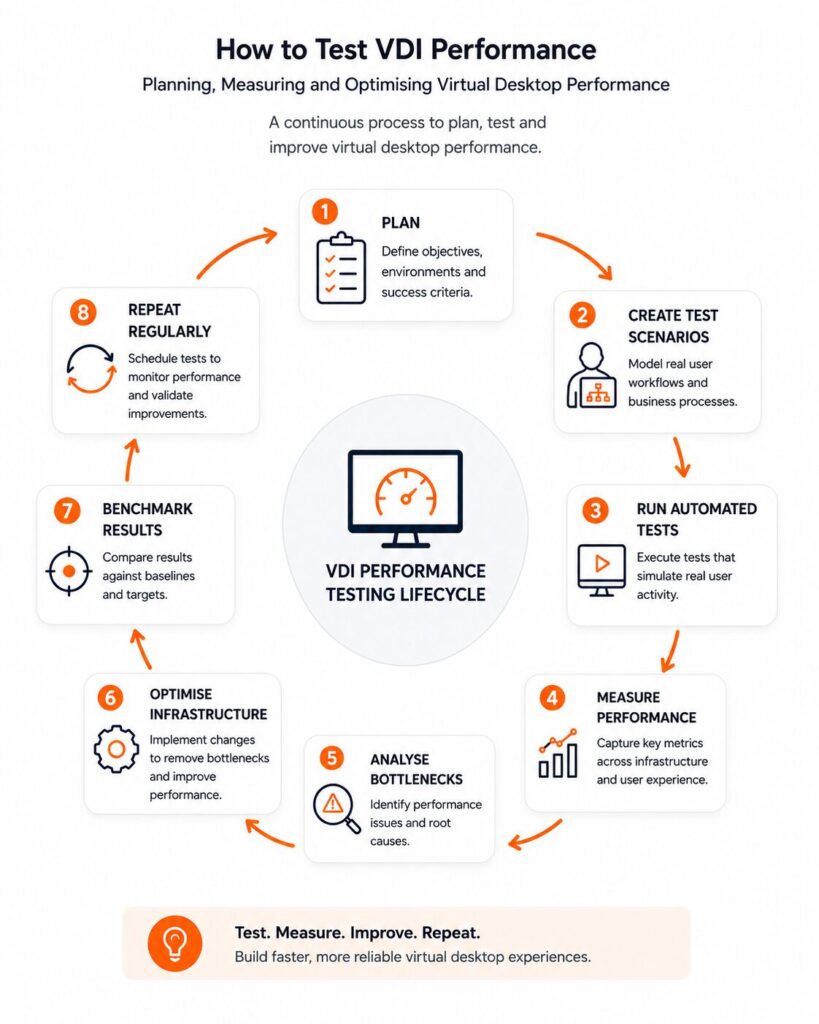
Creating a VDI Test Plan
A successful VDI test begins with a structured plan rather than simply running automated scripts.
A typical VDI test plan should define:
Objectives
What are you trying to validate?
Examples include:
- User login performance
- Application launch times
- Desktop responsiveness
- Infrastructure scalability
- Network performance
Test Scenarios
Create realistic user journeys that reflect everyday business activity, such as:
- User login
- Opening Office applications
- Accessing business systems
- File transfers
- Printing
- Logging off
Success Criteria
Define acceptable thresholds before testing begins, for example:
- Login within 15 seconds
- Application launch under 5 seconds
- Network latency below agreed limits
- CPU utilisation below target thresholds
Having measurable success criteria makes it easier to compare environments and identify regressions over time.
VDI Performance Test Plan Template
While every organisation’s environment differs, most VDI performance testing follows a similar structure.
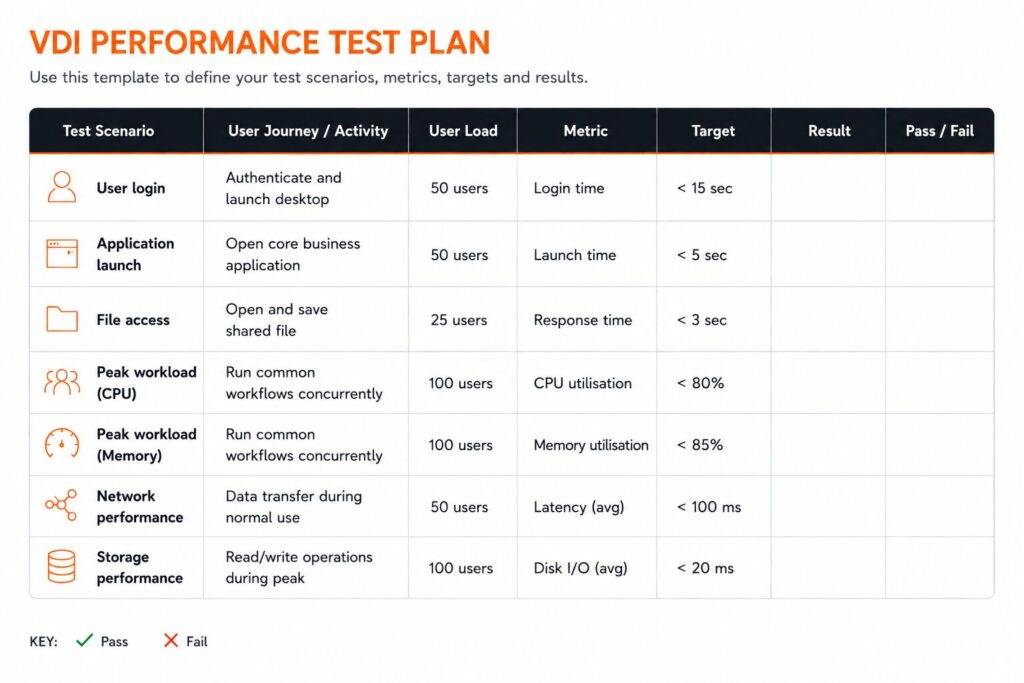
Using a consistent template makes it easier to compare performance over time and repeat testing after infrastructure changes.
Which Performance Metrics Should You Measure?
Some metrics provide far more value than others.
Key performance indicators include:
- Login duration
- Desktop availability
- Session launch time
- Application response time
- Network latency
- CPU utilisation
- Memory consumption
- Storage I/O
- Session disconnects
- User experience scores
Rather than relying on a single measurement, organisations should assess trends across multiple performance indicators to understand how infrastructure changes affect the user experience.
Automating VDI Performance Testing
Manual performance testing quickly becomes time-consuming and difficult to repeat consistently.
Automated testing allows organisations to:
- Repeat identical test scenarios
- Benchmark environments
- Detect performance degradation
- Validate upgrades
- Schedule regular testing
- Produce repeatable reports
Solutions such as T-Plan use image-based automation to interact with virtual desktops in the same way as an end user, providing realistic performance validation across Windows, Citrix and other virtual desktop environments.
Choosing VDI Performance Testing Tools
The right VDI performance testing tools should do more than generate synthetic load.
Look for solutions that can:
- Measure real user interactions
- Automate login and desktop workflows
- Benchmark response times
- Compare results over time
- Integrate with CI/CD pipelines
- Support enterprise reporting
- Test multiple virtual desktop platforms
Image-based automation is particularly useful where applications frequently change or traditional object-based automation struggles within virtual desktop environments.
Best Practices for Testing VDI Performance
To obtain meaningful results:
- Test realistic user workloads.
- Measure performance before and after infrastructure changes.
- Benchmark environments regularly.
- Test during peak usage periods.
- Monitor both infrastructure and user experience.
- Automate repeatable tests wherever possible.
- Track trends rather than isolated results.
Consistent testing provides the evidence needed to improve virtual desktop performance while reducing operational risk.
Ready to Automate VDI Performance Testing?
Manual testing can help identify performance issues, but maintaining consistent benchmarks across multiple virtual desktop environments quickly becomes time-consuming.
T-Plan enables teams to automate VDI performance testing, validate real user workflows and benchmark performance across Windows, Citrix and other virtual desktop environments using image-based automation.
VDI Performance Testing FAQs
VDI performance testing should be performed before major infrastructure changes, after software updates and as part of regular maintenance. Many organisations also schedule automated tests weekly or monthly to establish performance benchmarks and identify gradual degradation before users are affected.
Slow virtual desktops can result from several factors, including limited CPU or memory resources, storage bottlenecks, network latency, excessive concurrent users or poorly optimised applications. Testing helps isolate the source of the issue rather than relying on user feedback alone.
The most useful metrics include login duration, desktop launch time, application response times, network latency, CPU and memory utilisation, storage performance and overall user responsiveness. Measuring several metrics together provides a more complete picture of virtual desktop performance.
Yes. Simulating realistic user activity provides far more meaningful results than simply measuring infrastructure statistics. Automated workflows that log in, launch applications and complete common business tasks help identify issues that synthetic monitoring alone may miss.
Establish a baseline by running repeatable tests under consistent conditions and recording key performance metrics. Future results can then be compared against this baseline to identify regressions, improvements or the impact of infrastructure changes.
VDI performance testing measures how responsive the virtual desktop environment is from an end-user perspective, while load testing focuses on how the infrastructure behaves under increasing numbers of concurrent users. Most organisations benefit from using both approaches together.
A VDI test plan should define testing objectives, user scenarios, expected performance thresholds, success criteria, test environments and reporting requirements. A structured plan makes testing repeatable and ensures results can be compared over time.
Yes. Automated VDI performance tests can be scheduled alongside software releases and infrastructure changes, allowing teams to identify performance regressions early and maintain consistent user experience across virtual desktop environments.