A Guide to Verification and Validation Testing
Verification and validation are two of the most important concepts in software testing, yet they are often misunderstood or used interchangeably.
While both contribute to software quality, they serve different purposes throughout the software development lifecycle. Verification testing focuses on ensuring software is built according to documented requirements and specifications, while validation testing confirms that the final product meets user needs and performs as expected in real-world environments.
Put simply:
Verification asks: Did we build the product right?
Validation asks: Did we build the right product?
Both approaches are essential. Verification helps identify defects, inconsistencies and requirement gaps early in development, while validation ensures the completed application delivers the functionality, usability and reliability expected by users.
In this guide, we’ll explore the difference between verification and validation in software testing, when each should be used, common testing techniques, practical examples and how automation tools can support both processes.
Verification vs Validation Testing: Key Differences
Although verification and validation testing share the common goal of improving software quality, they focus on different stages of the software development lifecycle and answer different questions.
Verification testing evaluates whether software is being developed according to documented requirements, specifications and design standards. Validation testing evaluates whether the completed software fulfils its intended purpose and meets user expectations.
The key differences are summarised below.
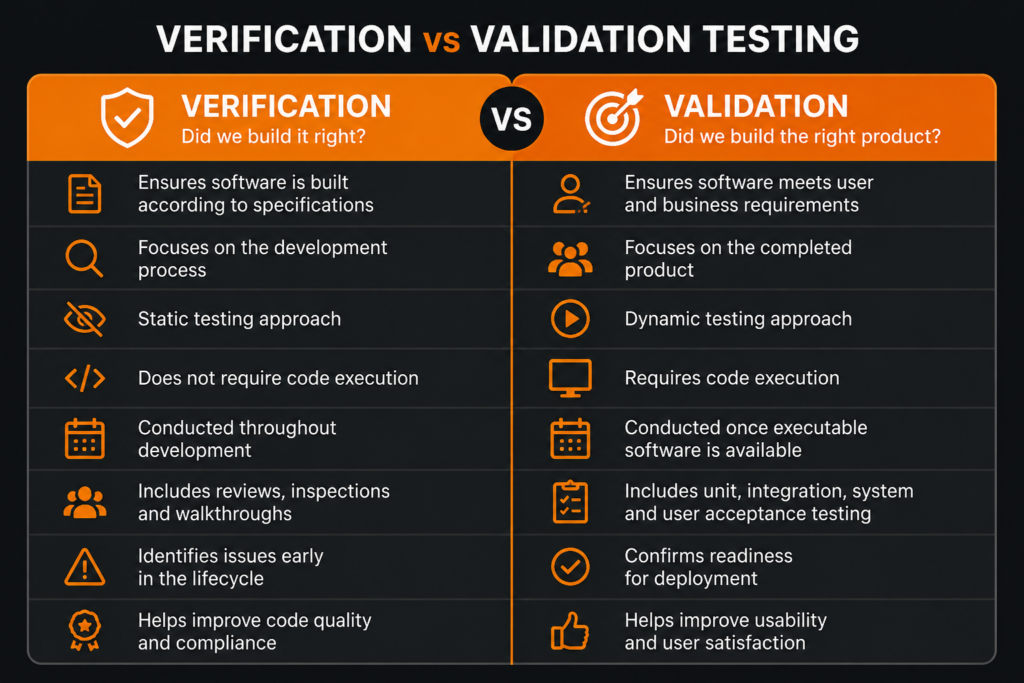
By combining verification and validation testing, organisations can improve software quality, reduce project risk and deliver more reliable applications. Verification ensures the product is being built correctly, while validation confirms the finished software solves the intended problem and performs as expected for end users.
What is Verification Testing and Why it Matters?
Verification testing is the process of evaluating software artefacts, documentation and code to ensure they comply with specified requirements and design standards.
Unlike validation testing, verification is a static testing activity. This means the software doesn’t need to be executed. Instead, teams review requirements, design documents and source code to identify defects, inconsistencies and potential issues before they progress further into the development lifecycle.
Effective verification testing helps organisations reduce development costs, improve code quality and minimise the risk of defects reaching later testing phases or production environments.
Common Verification Testing Techniques
Verification testing typically includes:
- Reviews
- Walkthroughs
- Inspections
- Static code analysis
These activities help identify issues early, improve collaboration and ensure development teams remain aligned with project requirements.
Verification Testing Example
A well-known example of verification testing can be found within the Chromium project, which underpins Google’s Chrome browser.
Every code change undergoes rigorous peer review and automated static analysis before being merged into the codebase. This process helps identify coding errors, security vulnerabilities and compliance issues early, helping maintain the reliability and performance expected by millions of users worldwide.
What is Validation Testing?
Validation testing is the process of evaluating software to ensure it meets user requirements, business objectives and real-world expectations.
Unlike verification testing, validation is a dynamic testing activity that requires the software to be executed. The goal is to determine whether the completed application behaves as intended and delivers the functionality, usability and performance expected by end users.
While verification testing focuses on whether software has been built according to specifications, validation testing focuses on whether those specifications result in a successful product. This makes validation a critical stage in the software development lifecycle, helping organisations identify issues before deployment and ensuring software is fit for purpose.
Effective validation testing reduces the risk of production failures, improves user satisfaction and provides confidence that applications will perform reliably in real-world environments.
Common Validation Testing Techniques
Validation testing can include a range of dynamic testing methods, including:
- Unit testing
- Integration testing
- System testing
- User acceptance testing (UAT)
- Performance testing
- UI testing
These testing activities help confirm that individual components, integrated systems and complete applications function as expected under a variety of conditions.
Validation Testing Example
Netflix provides a well-known example of validation testing at scale. With millions of users accessing the platform across different devices, operating systems and network conditions, maintaining a consistent user experience is critical.
To achieve this, Netflix continuously validates new features, interface updates and platform changes through extensive automated testing. Thousands of test scenarios are executed to verify functionality, performance and compatibility before updates are released to users.
This approach helps ensure that changes do not negatively impact the user experience and allows Netflix to maintain the reliability and performance expected by its global audience.
Verification vs Validation Testing: A Practical Perspective
A useful way to think about verification and validation is that verification focuses on reviewing and analysing, while validation focuses on testing and experiencing.
For example, a development team may verify that a hotel booking application has been designed according to its requirements and that all code follows development standards. Validation testing would then confirm that users can successfully search for rooms, complete bookings, process payments and receive confirmation emails.
Together, verification and validation testing provide a comprehensive approach to software quality, ensuring applications are both technically correct and capable of meeting real-world user needs.
Verification and Validation Throughout the Software Development Lifecycle
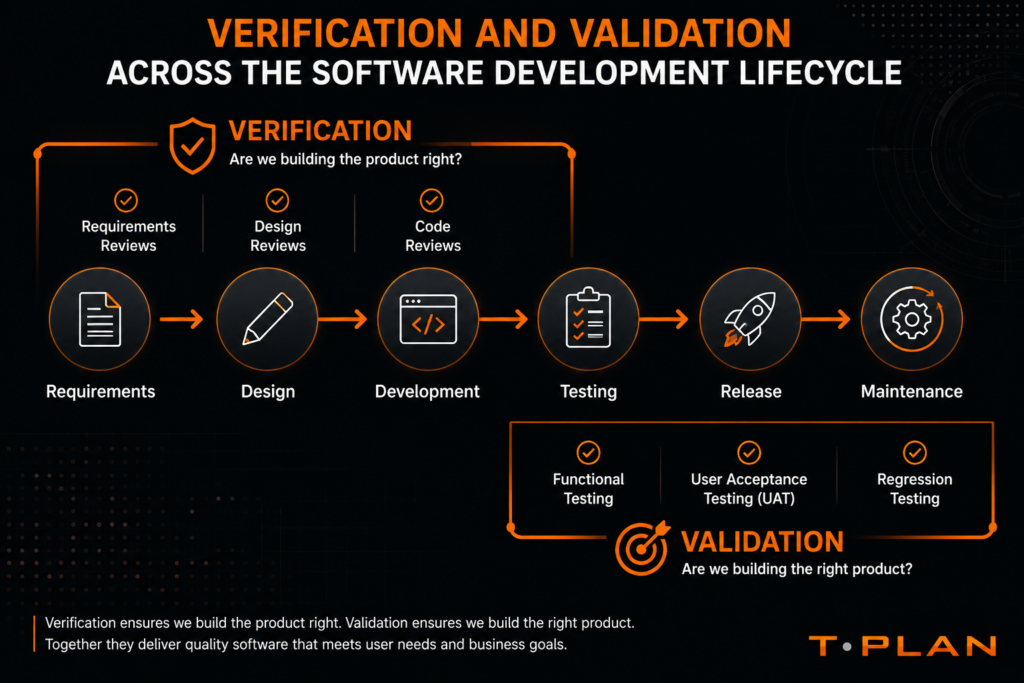
Verification and validation testing are not isolated activities. Both play important roles throughout the software development lifecycle (SDLC), helping teams identify issues early, reduce project risk and improve software quality before release.
While verification testing is typically performed during the planning, design and development phases, validation testing becomes increasingly important once working software is available. Together, they provide a structured approach to ensuring software is both technically correct and capable of meeting user expectations.
Requirements Phase
Verification begins at the earliest stages of a project. During requirements gathering, teams review business requirements, functional specifications and user stories to ensure they are complete, accurate and unambiguous.
Activities during this phase may include:
- Requirements reviews
- Stakeholder workshops
- Documentation inspections
- Traceability assessments
Identifying gaps or inconsistencies at this stage is significantly less costly than correcting them later in development.
Design and Development Phase
As software moves into design and development, verification activities continue through technical reviews and code analysis.
Development teams use verification testing to confirm that:
- System architecture aligns with requirements
- Design documents are technically sound
- Coding standards are being followed
- Security and compliance requirements are addressed
- Potential defects are identified early
Techniques such as walkthroughs, peer reviews and static code analysis help maintain quality before software reaches formal testing stages.
Testing Phase
Once executable software becomes available, validation testing takes centre stage.
At this stage, the focus shifts from reviewing documentation and code to evaluating how the application performs in practice. Testing teams execute test cases, validate functionality and assess how well the software meets user and business requirements.
Common validation activities include:
- Unit testing
- Integration testing
- System testing
- User acceptance testing
- Performance testing
- UI testing
This stage helps ensure that the software behaves as expected under real-world conditions.
Release and Maintenance Phase
Validation does not stop once software is deployed. Ongoing validation testing helps ensure that updates, enhancements and bug fixes continue to meet user expectations without introducing new issues.
Regression testing, compatibility testing and automated UI testing are commonly used to verify that applications remain stable as environments, devices and user requirements evolve.
Why Both Verification and Validation Matter
Successful software projects rely on both verification and validation testing.
Verification helps teams build software correctly by ensuring requirements, designs and code are aligned. Validation confirms that the finished application delivers the intended outcome for users.
When used together, these approaches reduce defects, improve software reliability and provide greater confidence throughout the development lifecycle.
Verification and Validation Testing Examples
Understanding the difference between verification and validation testing is often easier when viewed in a real-world context. The examples below demonstrate how both approaches contribute to software quality throughout the development lifecycle.
Verification and Validation Testing for an E-Commerce Shopping Cart
Imagine a retail development team is building a shopping cart system for an e-commerce platform. The requirements specify that users must be able to add products to their cart, view a running total and retain their cart contents between sessions.
Verification Testing
Verification testing focuses on ensuring these requirements have been correctly defined and implemented throughout development.
Typical verification activities may include:
- Reviewing requirements documentation to confirm all shopping cart functionality has been captured.
- Inspecting database designs to ensure fields such as product name, quantity and price use appropriate data types.
- Reviewing application logic to confirm calculations follow business rules.
- Conducting code reviews to ensure development standards are being followed.
These activities help identify issues before the software is executed.
Validation Testing
Validation testing focuses on confirming the shopping cart works as expected from the user’s perspective.
Validation activities may include:
- Adding products to the cart and confirming totals are calculated correctly.
- Updating product quantities and verifying pricing updates accurately.
- Testing that cart contents persist after logging out and returning.
- Attempting to add invalid quantities and confirming appropriate error messages are displayed.
- Verifying the checkout process completes successfully.
Automated testing tools can be used to simulate user interactions and validate behaviour across different browsers, operating systems and devices.
Verification and Validation Testing for a Hotel Booking Application
Consider a mobile application that allows users to search for available hotel rooms, complete bookings and receive confirmation emails.
Verification Testing
Before testing begins, verification activities help ensure the application has been designed correctly.
These activities may include:
- Reviewing requirements documentation to ensure booking workflows are clearly defined.
- Confirming data validation rules exist for dates, payment details and customer information.
- Verifying business rules for room availability and booking conflicts.
- Reviewing integrations with payment gateways and email services.
By identifying issues early, development teams can reduce costly rework later in the project.
Validation Testing
Validation testing confirms that users can successfully complete the booking process.
Common validation scenarios include:
- Searching for available rooms using different dates and locations.
- Completing bookings with valid customer information.
- Processing payments successfully.
- Receiving confirmation emails after booking.
- Attempting bookings with invalid payment details to verify error handling.
- Testing cancellation and amendment workflows.
These tests help ensure the application performs reliably under real-world conditions and delivers a positive user experience.
Key Takeaway
These examples demonstrate how verification and validation testing complement one another.
Verification testing ensures software is developed according to documented requirements and technical standards, while validation testing confirms that the completed application functions correctly and delivers value to end users.
Using both approaches throughout the software development lifecycle helps organisations reduce risk, improve software quality and deliver more reliable applications.
Best Practices for Verification and Validation Testing
Verification and validation testing are most effective when they form part of a structured quality assurance strategy rather than being treated as isolated testing activities. By following established best practices, organisations can improve software quality, reduce project risk and increase confidence in every release.
Start Verification Early
One of the most common mistakes in software development is waiting until testing begins to identify problems.
Verification activities should start during the requirements and design phases. Reviewing specifications, user stories and technical documentation early helps identify ambiguities, missing requirements and design flaws before development begins.
Addressing issues at this stage is typically far faster and less expensive than correcting them later in the project lifecycle.
Combine Static and Dynamic Testing
Verification and validation should not be viewed as alternatives. Both approaches address different risks and provide different insights into software quality.
Verification testing helps ensure software is being developed correctly, while validation testing confirms that the finished product performs as expected in real-world conditions.
Combining both approaches provides more comprehensive coverage and reduces the likelihood of defects reaching production environments.
Maintain Traceability Between Requirements and Tests
Effective testing requires clear links between business requirements and test cases.
Maintaining traceability helps teams demonstrate that all requirements have been reviewed, verified and validated throughout the project. This is particularly important in regulated industries such as healthcare, finance and defence, where compliance and auditability are often critical requirements.
Traceability also makes it easier to assess the impact of changes and ensure no functionality is overlooked during testing.
Automate Repeatable Validation Tests
As applications grow in complexity, manual testing alone can become difficult to scale.
Automating repeatable validation tests helps improve consistency, increase test coverage and reduce execution time. Automated testing is particularly valuable for:
- Regression testing
- Cross-platform testing
- UI testing
- Performance testing
- Repetitive business workflows
By automating routine testing activities, teams can focus more time on exploratory testing and complex scenarios that require human judgement.
Test Real User Workflows
Applications rarely fail because individual features stop working in isolation. Problems are often discovered when users attempt to complete end-to-end business processes.
Testing should therefore focus on realistic user journeys as well as individual functions. This helps identify usability issues, workflow bottlenecks and integration problems that may not be visible through isolated test cases.
Testing software from the user’s perspective provides greater confidence that the application will perform successfully in production environments.
Continuously Validate After Release
Verification and validation should continue beyond the initial release.
New features, operating system updates, browser changes and infrastructure modifications can all introduce unexpected issues. Ongoing validation through regression testing and automated test execution helps ensure software remains reliable as environments evolve.
Continuous testing also enables organisations to release updates more confidently while reducing the risk of introducing new defects.
Build Verification and Validation into Your Development Process
The most successful software teams integrate verification and validation throughout the software development lifecycle rather than treating them as final checkpoints before release.
By reviewing requirements early, automating repeatable tests and continuously validating real-world user workflows, organisations can improve software quality, accelerate delivery and reduce the risk of costly failures.
Verification and Validation Testing Tools
Modern software development relies heavily on testing tools to improve efficiency, increase coverage and support both verification and validation activities throughout the software development lifecycle.
Different tools serve different purposes. Some focus on analysing code and documentation without execution, while others automate functional, integration and user interface testing across multiple environments.
Static Analysis and Verification Tools
Verification testing often uses static analysis tools to review code quality, identify vulnerabilities and enforce coding standards before software is executed.
Popular verification tools include:
- SonarQube – Provides automated code quality analysis, identifying bugs, vulnerabilities and maintainability issues.
- Checkmarx – Performs static application security testing (SAST) to detect security risks early in development.
- ESLint – Helps enforce coding standards and identify issues in JavaScript applications.
- Pylint – Provides code analysis and quality checks for Python projects.
These tools help development teams identify defects early, reducing the cost and complexity of fixing issues later in the lifecycle.
Functional and Validation Testing Tools
Validation testing requires software execution to confirm functionality, performance and usability.
Common validation tools include:
- Selenium – A widely used framework for automating web browser interactions and functional testing.
- Appium – Supports automated testing of native, hybrid and mobile web applications.
- Postman – Commonly used for API testing and validation.
- JUnit and PyTest – Popular frameworks for unit and integration testing.
These tools help teams validate that software behaves correctly under a variety of conditions and user scenarios.
UI Testing and User Experience Validation
As applications become increasingly complex, many organisations are recognising the importance of validating what users actually see and experience.
Traditional automation frameworks often focus on underlying code, objects or APIs. While these approaches are valuable, they may not always identify issues such as:
- Visual defects
- Layout inconsistencies
- Missing UI elements
- Rendering problems
- Workflow failures
Visual UI testing provides an additional layer of validation by evaluating software from the user’s perspective. This helps ensure that applications not only function correctly but also deliver a consistent and reliable user experience across different devices, operating systems and environments.
Choosing the Right Testing Tools
There is no single testing tool that suits every organisation.
The most effective testing strategies typically combine multiple technologies to support different stages of verification and validation. Factors such as application type, technical requirements, regulatory obligations and team expertise will influence which tools are most appropriate.
Many organisations adopt a combination of static analysis tools, functional testing frameworks and visual UI testing platforms to achieve comprehensive software quality assurance.
By selecting the right mix of technologies, teams can improve testing efficiency, increase coverage and deliver more reliable software releases.
How T-Plan Supports Verification and Validation Testing
Verification and validation testing require more than simply executing test cases. Modern software teams need to validate functionality across multiple operating systems, browsers, devices and application types while maintaining consistency, accuracy and efficiency.
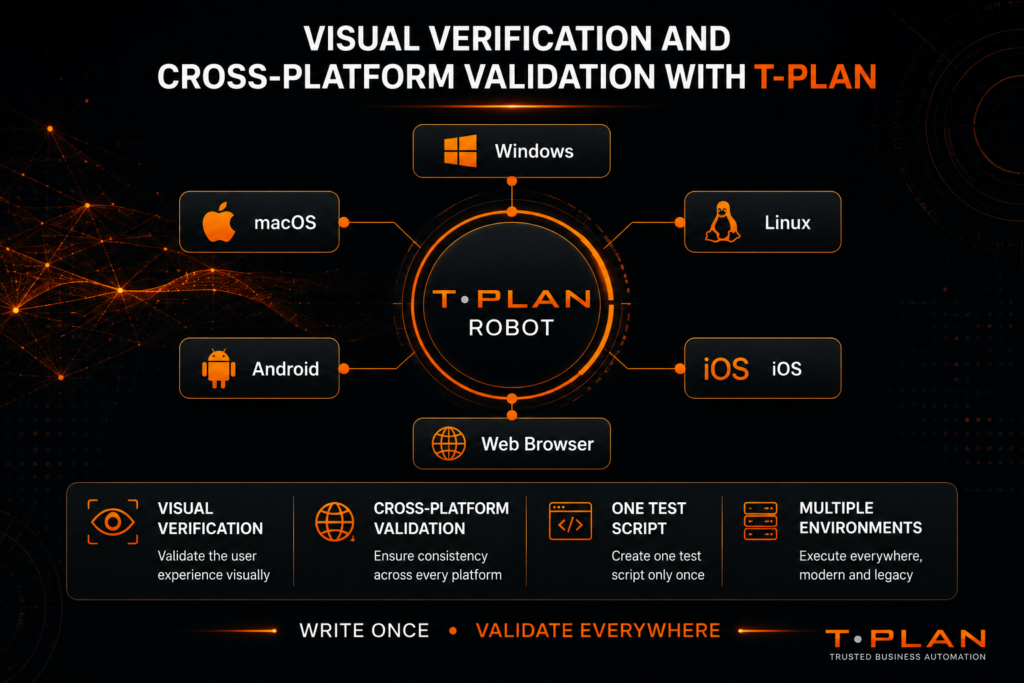
T-Plan helps organisations streamline verification and validation activities by providing a flexible, visual automation platform capable of testing modern, legacy and hybrid applications from a single solution.
Cross-Platform Validation Testing
One of the biggest challenges in software testing is maintaining consistent behaviour across different environments.
Applications often need to support multiple operating systems, browsers and devices, each with their own configurations and potential compatibility issues.
T-Plan enables teams to create automated tests that can be executed across:
This approach helps organisations increase coverage, reduce duplication and validate application behaviour across a wide range of environments without maintaining multiple test frameworks.
Visual UI Verification
Many testing tools focus primarily on underlying code, APIs or object recognition. While these methods are valuable, they do not always reflect the user’s actual experience.
T-Plan uses image-based automation and visual validation to verify what users actually see on screen.
This allows teams to identify issues such as:
- Missing interface elements
- Rendering problems
- Layout inconsistencies
- Workflow failures
- Unexpected UI changes
By validating the user interface directly, organisations can gain greater confidence that applications will function correctly in real-world environments.
Testing Legacy and Modern Applications
Many organisations operate a mixture of web applications, desktop software, virtualised environments and legacy systems.
Traditional automation tools can struggle when applications lack accessible objects or APIs. T-Plan’s visual approach removes many of these limitations, enabling organisations to automate testing across a broad range of technologies without requiring changes to the underlying application.
This makes T-Plan particularly valuable for organisations with complex or long-established technology estates.
Supporting Regulated Industries
Industries such as defence, healthcare, finance and government often face additional testing challenges, including security requirements, compliance obligations and extensive validation processes.
T-Plan has over 25 years of experience supporting organisations operating within highly regulated environments where reliability, repeatability and auditability are essential.
The platform’s visual validation capabilities, reporting features and cross-platform support help organisations maintain confidence in software quality while meeting industry requirements.
Real-world example: A leading defence sector organisation used T-Plan to automate testing for a critical COVID-19 application that required cross-platform support across Windows, macOS, Linux, iOS and Android. The team was able to install the platform, begin creating usable test scripts and start executing tests within 15 minutes, helping accelerate deployment while maintaining strict security and compliance requirements.
Integration with Existing Testing Frameworks
T-Plan is designed to work alongside existing testing tools and development processes.
Organisations can integrate T-Plan with technologies such as:
- Selenium
- Jenkins
- CI/CD pipelines
- Enterprise reporting platforms
- Command-line execution environments
This allows teams to extend existing automation investments while benefiting from visual validation and cross-platform execution capabilities.
Faster Testing and Greater Confidence
By combining visual automation, cross-platform support and flexible integration options, T-Plan helps organisations reduce manual effort, improve testing consistency and accelerate software delivery.
Whether validating a web application, a desktop-based business system or a mission-critical application operating within a regulated environment, T-Plan provides the tools needed to support comprehensive verification and validation testing throughout the software development lifecycle.
Verification vs Validation Testing FAQs
Verification testing should always take place before validation testing. Verification activities help ensure requirements, designs and code meet specifications before software is executed. Once working software is available, validation testing can confirm that the application meets user and business requirements.
T-Plan supports CAD automation by interacting with the software exactly as a user would at screen level. This enables teams to automate testing, validate visual outputs and standardise workflows across any device or platform without plug-ins, code changes or CAD-specific integrations.
While it is possible to perform only one type of testing, it is not recommended. Verification testing alone may produce software that meets specifications but fails to satisfy user expectations. Validation testing alone may identify user-facing issues while overlooking defects, inconsistencies or compliance concerns introduced during development.
System testing is a form of validation testing because it involves executing a complete application to verify that all integrated components function correctly and meet business requirements.
Unit testing is generally considered a validation testing activity because it requires code execution to confirm that individual functions, methods or components behave as expected.
Verification and validation testing help organisations improve software quality, reduce development risk and increase confidence in software releases.
Key benefits include:
- Earlier defect detection
- Improved code quality
- Better compliance and traceability
- Reduced rework costs
- Improved user satisfaction
- More reliable software releases
AI can assist with both verification and validation activities by helping identify code defects, generate test cases, analyse application behaviour and optimise test coverage.
However, while AI can accelerate testing processes, human oversight remains important to ensure that generated tests are accurate, repeatable and aligned with business objectives.
Verification, validation and testing in software engineering all play essential roles in delivering reliable software. Verification ensures software is developed according to requirements and standards, while validation confirms that the finished product meets user expectations and performs successfully in real-world environments. Together, they form a comprehensive quality assurance strategy that supports successful software delivery.