

























Automated Testing Tool For Desktop Applications

Develop, Schedule and Execute Tests on Windows, Linux, Mac, or Unix desktop applications with T-Plan Robot, the most flexible test automation solution on the market.

With low-code and no-code options, T-Plan’s automated testing tools help increase efficiency across the testing cycle, accelerating the testing process and reducing costs while seamlessly supporting cross-platform projects.

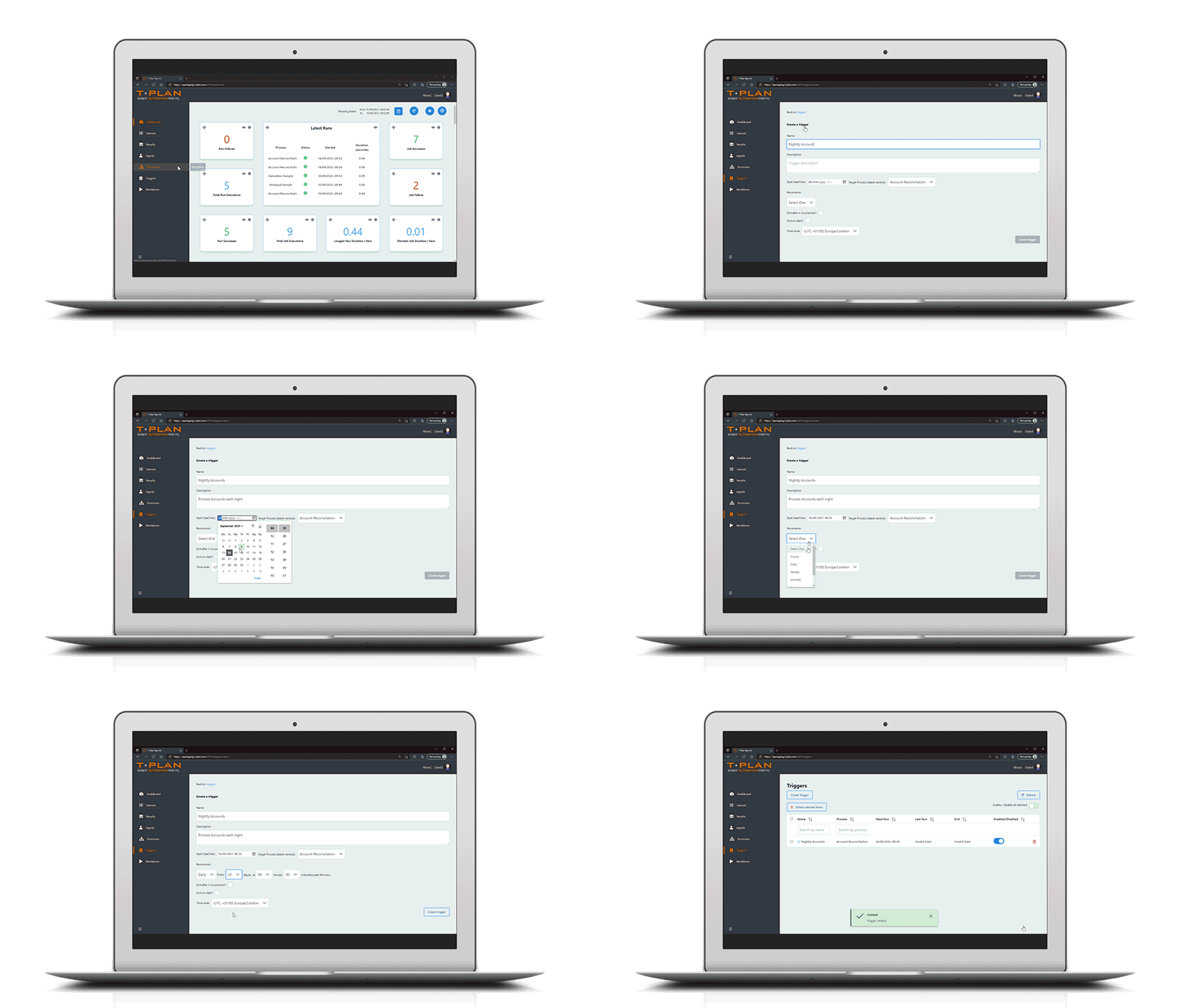
T-Plan running on desk top and laptop showing that it works on any operating system and platform.

Automated Desktop Application Testing: Key Features

No-Code
Required

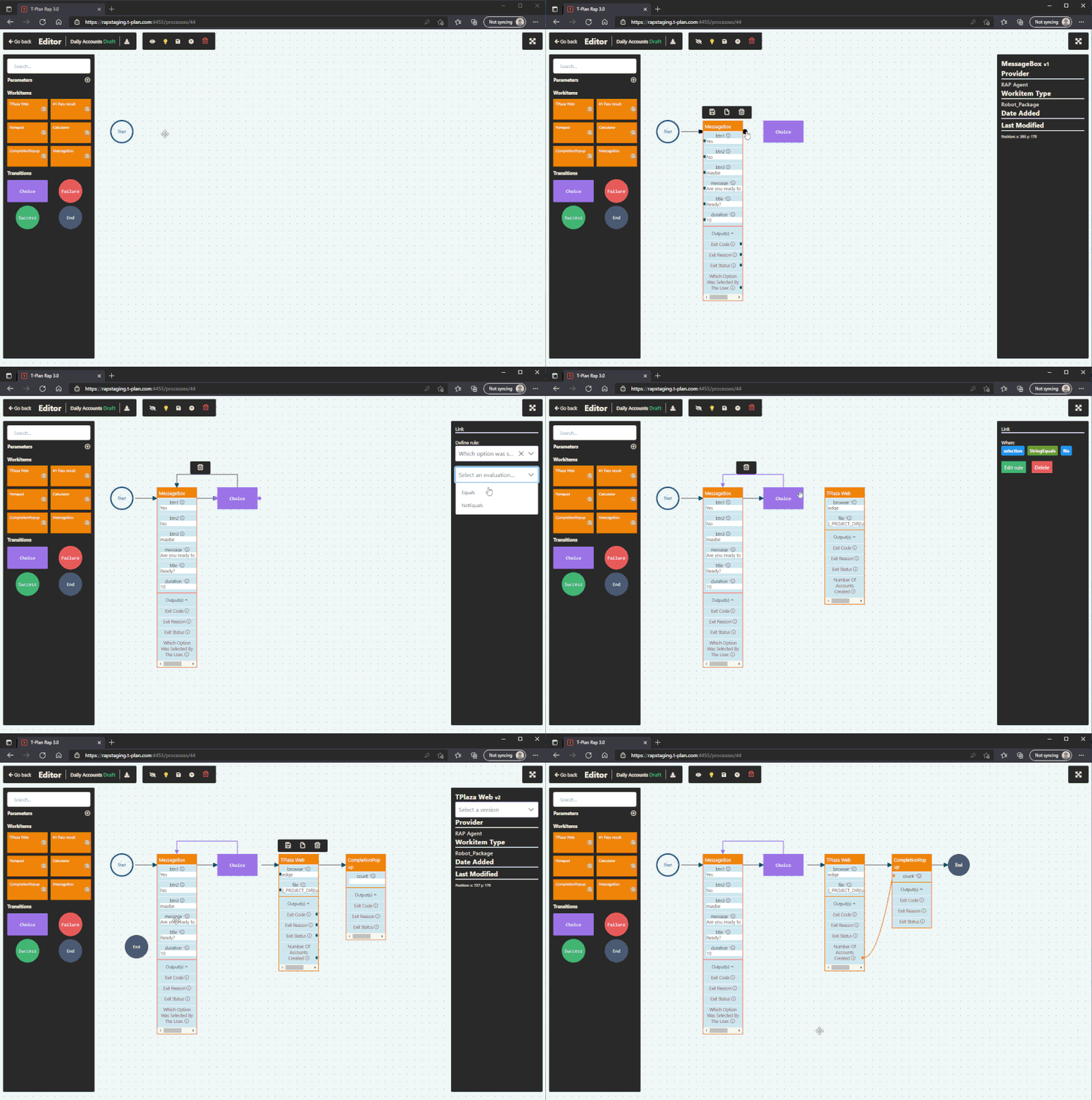
Use an intuitive drag‑and‑drop interface to automate desktop applications without scripting, so both technical and non‑technical users can build reliable tests.

Create Once, Repeat Anywhere

Design image‑based desktop tests once and replay them across different machines, resolutions and operating systems, supporting agile and continuous delivery.

Record and
Playback

Record real user interactions on your desktop applications and replay them step‑by‑step for fast test creation and repeatable visual regression checks.

External Data
Integration

Drive desktop automation with live data from spreadsheets, databases, PDFs or APIs to cover realistic business workflows and edge cases.

Screen-Level
Automation

Automate at the screen level, interacting with windows, dialogs and controls exactly as a user would, independent of the underlying technology stack.

Multi-Platform
Support

Run the same automation across Windows, macOS and Linux desktops – including physical machines, VMs and remote sessions – from a single platform.

Image-Based for True End-User Simulation

Use image‑based recognition to execute tests exactly as users see the interface, validating icons, text and layouts across complex desktop UIs.

Third-Party
Integrations

Connect with CI/CD pipelines such as Jenkins and other toolchains to trigger desktop tests automatically as part of your build and release process.

Why Automate Desktop Application Testing?

Our automated testing tool for desktop applications helps teams release desktop software faster, with higher quality and lower cost. Key benefits include:

  • Speeding up test execution to accelerate the overall desktop test automation cycle.
  • Increasing efficiency and reducing the costs of long test cycles and manual desktop testing.
  • Improving reliability by reducing human error and running repeatable, automated desktop tests.
  • Enabling more comprehensive coverage by testing more scenarios, configurations and inputs than is feasible manually.
  • Testing across multiple operating systems (Windows, macOS and Linux) to ensure cross‑platform compatibility for your desktop applications.
  • Making desktop test automation easier to maintain over time by standardising tests and reducing brittle, UI‑specific scripts.
  • Supporting audit and compliance needs by running consistent, repeatable automated tests for every desktop application release (where relevant).

Automate Key Tests for Desktop Applications

T‑Plan’s desktop application automation testing tool supports a wide range of test types, helping you standardise and scale critical checks across desktop software:

  • Installation and configuration testing
  • Cross‑platform compatibility testing
  • Security testing
  • Performance and load testing
  • Regression testing for frequent releases
  • Functional UI testing of windows, menus and dialogs
  • Smoke and sanity testing for every new desktop build
  • End‑to‑end workflow testing that spans multiple desktop applications and systems

Trusted by Hundreds of Companies and Used by Thousands of People for Over 25 Years

Why Choose T-Plan for Desktop App Testing

By choosing T‑Plan Robot, you are choosing a flexible desktop test automation tool that works across platforms and operating systems, while remaining easy to use and genuinely user‑friendly. 

Automate desktop application testing without writing code by using intuitive image‑based recognition that mimics real user interactions, making tests faster, more consistent and easier to maintain. 

Because T‑Plan operates at the operating system level, the same approach can be applied to different desktop applications and technologies, reducing tool sprawl and simplifying your automation stack.

T-Plan Logo
Animated Laptop with T-Plan Robot working on desktop

Any Desktop Application, On Any OS

T‑Plan Robot is a Java and browser based solution that gives you the flexibility to automate tests for any desktop application, including web based applications, across Windows, Linux, macOS and Unix.

Because T‑Plan executes automation at the operating system level, the underlying application technology becomes irrelevant. A single desktop test automation tool can drive any GUI application, or a set of applications built with different technologies, across multiple platforms.

Low Code or No Code Testing

T-Plan allows anyone within your organisation to design and execute end-to-end testing tasks across any device, browser, OS and technology. With record and playback functionality, you can repeat, edit and enhance at every step.

The intuitive flow and drag and drop UI is designed for tech and non-tech staff alike, aiding adoption across your organisation.

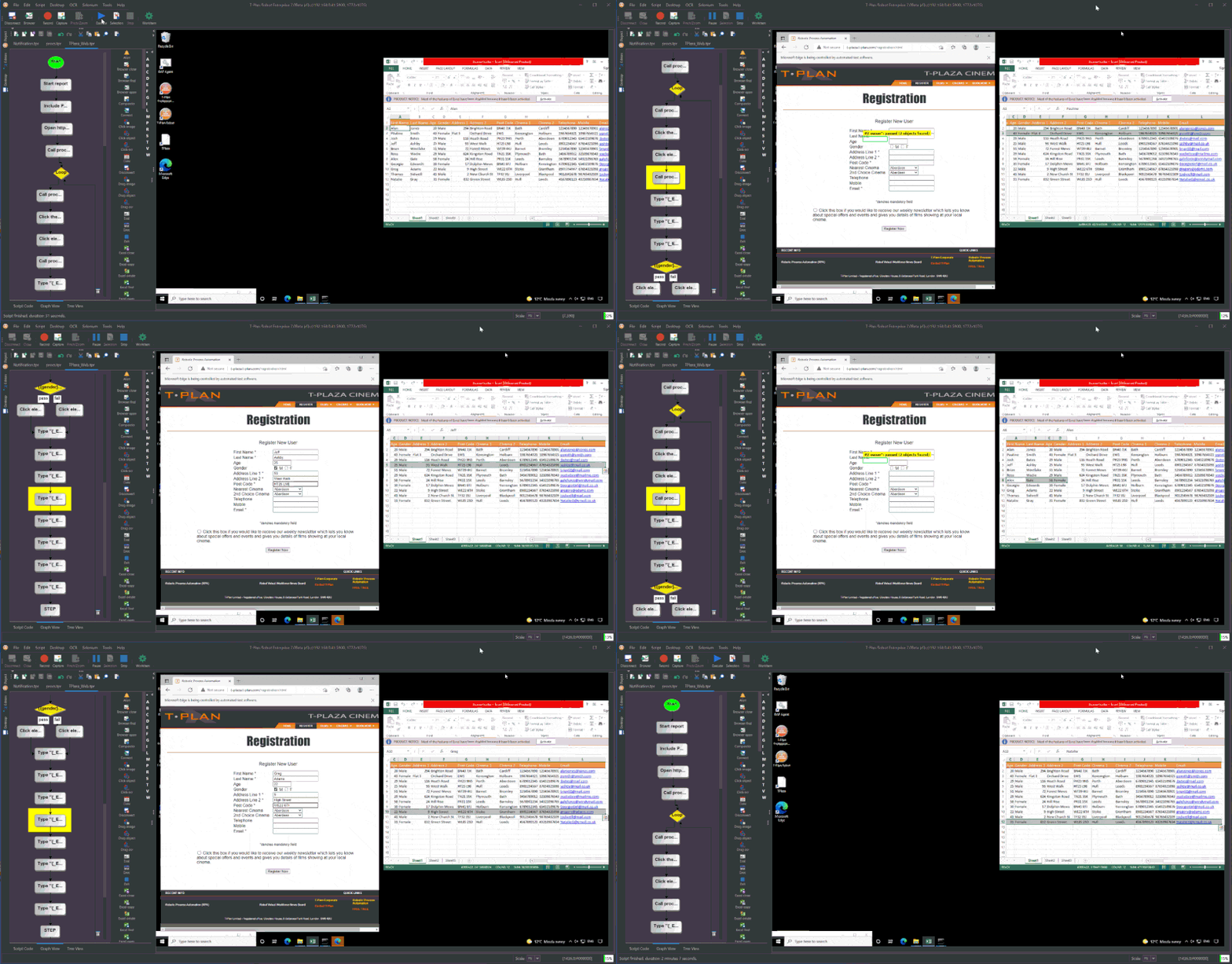
Demonstration of T-Plan GUI
Banking Automation Demonstration

Image Based Test Automation

T-Plan Robot is the most flexible test automation tool on the market. As an image-based tool, it provides a true “end-user approach”, making it extremely easy to learn. 

The tool navigates through the GUI the same way a user does and verifies the test results visually, seeing the same image output as the user.  This verifies UI design, usability and correct asset placement and ensures SUT adheres to visual impairment parameters within your desktop application.

Playback and Data Recording for Tests

The ability to record tests gives you full oversight of the testing process and lets you play back key tests for additional insights.

Within T-Plan Robot, users can capture their interactions within the desktop application and generate automated tests based on these recordings. This feature accelerates test creation and ensures accurate replication of user scenarios in continuous testing.

Animated Laptop with T-Plan Robot working on desktop
Banking Automation Demonstration

Robust Reporting and Analytics for Results

T-Plan’s testing tool offers a comprehensive reporting platform with access to various charts, plots, and visualisations.

This is essential for quickly understanding the quality state of the desktop application, alongside analysing trends and test data. Gain fuller insights through advanced reporting features such as screenshots, videos, and error traces, which can aid in debugging and analysis.

Integrations and Plugins for Desktop Testing

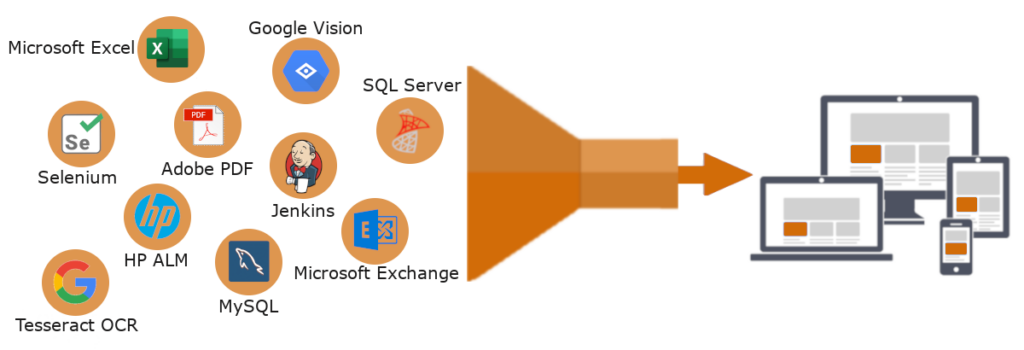
T-Plan Robot offers native integrations to Selenium, Jenkins, Google Vision, ABBYY, Tesseract, Office365, Gmail, ALM, and SQL Databases and more.

Diagram showing that T-Plan’s testing tool integrates with multiple platforms such as Selenium, Jenkins and SQL

Our testing tool also provides native plugins for iOS, Android, and other utilities (command line etc.) in addition to working in collaboration with customers to build bespoke plugins for complete platform flexibility.

Run Application Tests in Parallel With a Central Portal

Tests can be run in parallel across both physical and virtual machines powered by T-Plan Robot, and managed across multiple departments using our web-based Robot Automation Portal (“RAP”).

The T-Plan Robot Automation Portal  is a web application that allows small and corporate-sized teams to manage their RPA efforts, streamlining the operational overhead into a central single-view portal which can be accessed from any browser, on any OS, from any location.

Through a simple interface, automated actions can be synchronised into an efficient process flow with visibility from start to finish. Easily view current status, past results and queued tasks across your entire Robot workforce from a central viewpoint.

What Our Automated Application Testing Tool Users Have To Say About Us

Quotation Mark

6 hour process now takes 10 minutes. Our virtual robots have saved time, effort, money & resource.”

NHS Logo
Quotation Mark

Reduced man hours by approximately 1 hour per day per tester. At that level, saving us 32.5 hours per week – a considerable cost saving.”

Esri Logo

Automated Desktop Application Testing FAQs

Desktop application testing is the process of validating that a software application installed on a local machine functions correctly, reliably and securely. Unlike web applications, desktop software runs directly on an operating system such as Windows, macOS or Linux, meaning testing must account for system resources, hardware configurations and OS-specific behaviours.

Desktop testing typically covers functionality, usability, performance, compatibility and regression testing to ensure the application behaves as expected across different environments.

Desktop applications can be tested manually or through automation.

Manual testing involves a tester interacting with the software to validate workflows, features and performance. While useful for exploratory testing, it can be time-consuming and difficult to scale.

Automated testing uses specialised tools to replicate user actions and validate expected outcomes. This may include:

  • UI automation tools that interact with the graphical interface
  • Object-based testing tools that hook into application elements
  • Image-based or visual testing tools that validate behaviour at screen level

For complex or legacy desktop systems, screen-level automation can provide greater flexibility where code-level access is limited.

Automated desktop testing involves creating repeatable scripts that simulate real user interactions, such as clicking menus, entering data and navigating workflows. These scripts can then be executed repeatedly for regression testing, compatibility testing or continuous integration pipelines.

T-Plan enables automated desktop application testing through visual, screen-level automation. It interacts with applications as a user would, making it suitable for:

  • Windows, macOS and Linux desktop environments
  • Legacy or closed systems
  • Applications where object identifiers are unstable or unavailable

Tests can be executed in parallel, scheduled overnight and integrated into broader QA or DevOps workflows.

When planning desktop application testing, it is important to consider:

  • The operating system and environment the application runs on
  • The size and complexity of the software
  • Resource availability, including time and skilled testers
  • Hardware dependencies or system-specific configurations
  • Frequency of updates and required regression coverage
  • Integration with other desktop or enterprise systems

Automation is particularly valuable where applications are large, frequently updated or business-critical.

Most desktop applications can be automated, including enterprise software, finance systems, CAD tools, healthcare applications, internal business platforms and legacy software. Visual automation tools such as T-Plan are especially useful where direct API or code-level integration is not possible.

Automated desktop testing is faster and more scalable for repetitive tasks such as regression testing. Manual testing remains valuable for exploratory scenarios, but automation improves consistency, reduces human error and frees testers to focus on higher-value activities.

Yes. Automated desktop testing can be integrated into continuous integration and deployment workflows, enabling regression suites to run automatically after code changes. This helps teams detect defects earlier and maintain release confidence.

Yes. Many modern automation platforms, including T-Plan, support execution within virtual machines or remote desktop environments, allowing secure and scalable deployment without modifying the system under test.

Book your FREE demo

You’re just one step away from saving time & money – get in touch today.

  • No code access required
  • Visual UI testing tool
  • iOS and Mac compatible
  • All platforms supported
  • Mimics real time user experience
  • Record and playback function
  • Award winning support

Book your FREE demo

Get in touch with our award-winning team today and unlock the power of our Automated Visual UI testing tool for your business.